Mastering Remote Work: Step-by-Step Secure VPN Setup in Under 15 Minutes
Mastering Remote Work: Step-by-Step Secure VPN Setup in Under 15 Minutes
In today’s interconnected world, remote work has become more than just a trend; it’s a fundamental shift in how many of us conduct our professional lives. While the flexibility and convenience are undeniable, they come with an increased need for robust cybersecurity. One of the most critical tools in a remote worker’s arsenal is a Virtual Private Network, or VPN. A secure VPN setup is not just a ‘nice-to-have’ but an essential component for safeguarding your data, maintaining privacy, and ensuring secure access to company resources from any location. The good news? Setting up a secure VPN doesn’t have to be a daunting, time-consuming task. In fact, with the right guidance, you can achieve a robust secure VPN setup in under 15 minutes.
This comprehensive guide is designed to walk you through every step of the process, from understanding what a VPN is and why you need one, to choosing the right service, and finally, getting it up and running with minimal fuss. We’ll demystify the technical jargon and provide clear, actionable instructions, ensuring that even those with limited technical expertise can achieve a successful secure VPN setup. By the end of this article, you’ll be equipped with the knowledge and confidence to protect your digital footprint while enjoying the freedom of remote work.
Whether you’re new to remote work or looking to enhance your existing cybersecurity measures, this guide will prove invaluable. We’ll cover everything from the basics of VPN technology to advanced tips for optimizing your secure connection. So, let’s dive in and transform your remote work experience into a fortress of digital security!
Understanding the Imperative: Why a Secure VPN Setup is Non-Negotiable for Remote Work
Before we delve into the ‘how-to,’ it’s crucial to understand the ‘why.’ The internet, while a powerful tool, is also a vast landscape riddled with potential threats. When you’re working remotely, especially if you’re connecting from public Wi-Fi networks in cafes, airports, or co-working spaces, your data is particularly vulnerable. Without a secure VPN setup, your online activities, sensitive company information, and personal data can be easily intercepted by cybercriminals.
The Risks of Unprotected Remote Connections
- Data Interception: On unsecured networks, anyone with basic hacking tools can snoop on your internet traffic, potentially capturing login credentials, financial information, and confidential company documents.
- Malware and Phishing Attacks: Public Wi-Fi networks are often targets for malicious actors who can set up fake hotspots or inject malware into your browsing sessions.
- Geo-restrictions and Censorship: Some online services or company resources might be geographically restricted, or you might encounter internet censorship in certain regions, hindering your productivity.
- Privacy Concerns: Your Internet Service Provider (ISP) and other third parties can track your online activities, potentially selling your data or using it for targeted advertising.
- Unsecured Access to Company Resources: Connecting to your company’s internal network without a VPN can expose sensitive data and systems to external threats, creating significant security vulnerabilities.
How a Secure VPN Setup Mitigates These Risks
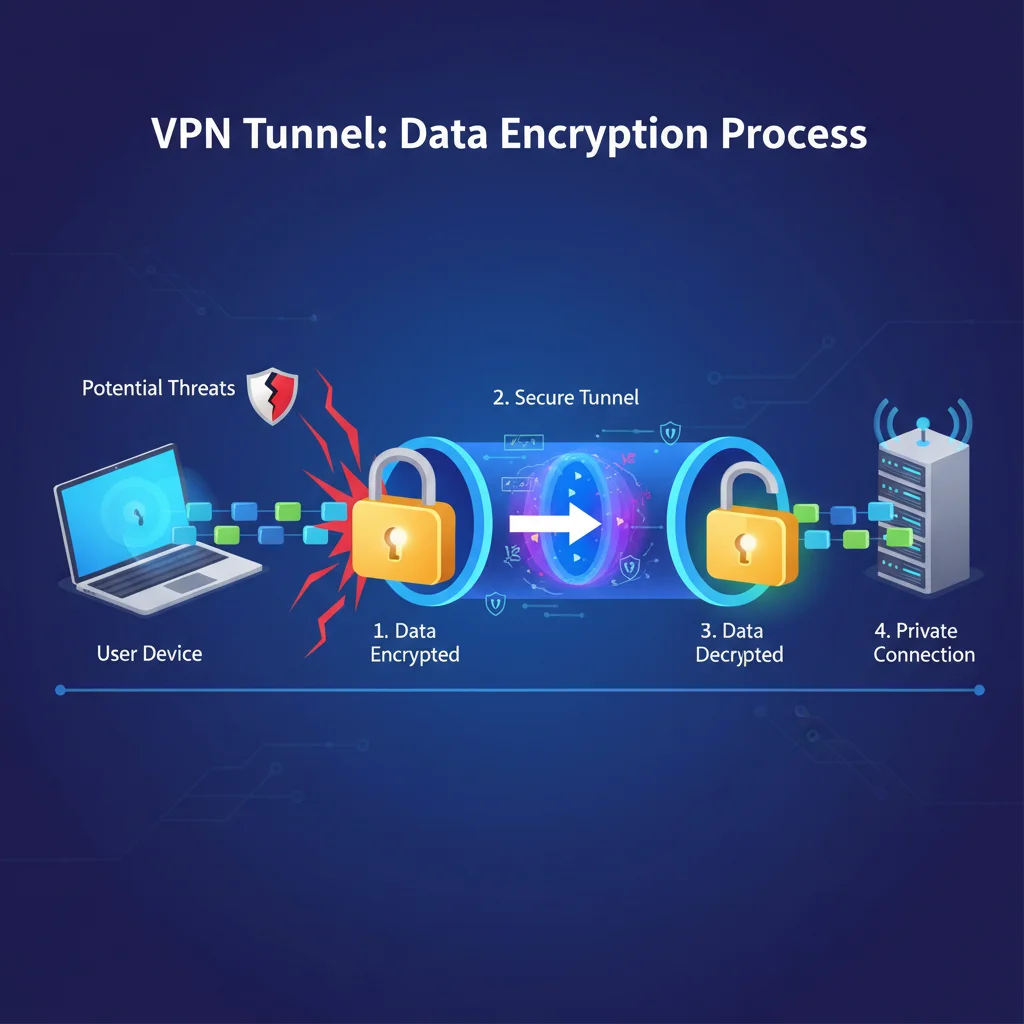
A VPN creates an encrypted tunnel between your device and the internet. All your internet traffic passes through this tunnel, making it unreadable to anyone outside of it. Here’s how a secure VPN setup addresses the aforementioned risks:
- Encryption: Your data is encrypted, meaning even if intercepted, it appears as gibberish to unauthorized parties. This is the cornerstone of a secure VPN setup.
- Anonymity: Your real IP address is masked and replaced with the IP address of the VPN server. This makes it difficult to track your online activities back to your physical location.
- Secure Access: Many organizations require a VPN for employees to securely access internal networks and sensitive applications, ensuring that only authorized personnel can reach critical resources.
- Bypassing Restrictions: By connecting to a server in a different geographical location, a VPN allows you to bypass geo-restrictions and censorship, granting you access to content and services that might otherwise be unavailable.
- Protection on Public Wi-Fi: A VPN shields your data from prying eyes on public networks, making it safe to work from anywhere without fear of data breaches.
Understanding these benefits underscores the critical importance of a secure VPN setup for anyone engaged in remote work. It’s not just about compliance; it’s about safeguarding your professional integrity and personal security.
Step 1: Choosing the Right VPN Service for a Secure VPN Setup
The first and arguably most crucial step in achieving a secure VPN setup is selecting a reputable VPN service. The market is saturated with options, both free and paid, but not all VPNs are created equal. For remote work, where data security is paramount, investing in a high-quality, paid VPN service is highly recommended.
Key Factors to Consider When Choosing a VPN:
- Security Features: Look for VPNs that offer strong encryption protocols (e.g., OpenVPN, WireGuard, IKEv2/IPSec), a kill switch (which automatically disconnects your internet if the VPN connection drops), and DNS leak protection. These features are fundamental to a truly secure VPN setup.
- No-Log Policy: A strict no-log policy means the VPN provider does not track, collect, or store your online activity. This is vital for privacy and anonymity. Always read their privacy policy carefully.
- Server Network: A large and diverse server network means more options for connecting to different locations, potentially offering better speeds and the ability to bypass more geo-restrictions.
- Speed and Performance: A VPN will inevitably add some overhead, but a good service will minimize speed degradation. Look for providers known for fast connection speeds, which are crucial for productivity during remote work.
- Device Compatibility: Ensure the VPN service offers apps for all your devices (Windows, macOS, Linux, iOS, Android) and supports simultaneous connections across multiple devices.
- Customer Support: Responsive and knowledgeable customer support can be a lifesaver if you encounter any issues during your secure VPN setup or daily use. Look for 24/7 support via live chat or email.
- Pricing and Money-Back Guarantee: Compare pricing plans and consider providers that offer a money-back guarantee, allowing you to test the service risk-free.
Recommended VPN Providers for Remote Work:
While personal preferences vary, some VPNs consistently rank high for security, performance, and features suitable for remote work:
- ExpressVPN: Known for its exceptional speed, strong encryption, and extensive server network. It’s user-friendly and offers robust security features.
- NordVPN: Offers advanced security features like Double VPN, CyberSec (ad and malware blocker), and a strict no-logs policy. It’s a popular choice for a comprehensive secure VPN setup.
- Surfshark: An excellent budget-friendly option that doesn’t compromise on security. It allows unlimited simultaneous connections, making it ideal for teams or individuals with multiple devices.
- Private Internet Access (PIA): Offers a vast server network and strong privacy features, popular among users who prioritize anonymity.
Once you’ve selected a VPN provider based on these criteria, you’re ready to move on to the practical steps of your secure VPN setup.
Step 2: Subscription and Software Installation (5 Minutes)
With your chosen VPN provider in mind, the next step is to subscribe to their service and install the necessary software on your devices. This process is generally straightforward and designed to be user-friendly, allowing for a quick secure VPN setup.
Subscription Process:
- Visit the VPN Provider’s Website: Navigate to the official website of your chosen VPN service.
- Choose a Plan: Select a subscription plan that suits your needs. Longer-term plans usually offer better value.
- Create an Account: You’ll typically need to provide an email address and create a password.
- Complete Payment: Follow the instructions to complete your payment. Most providers accept various payment methods, including credit cards, PayPal, and cryptocurrencies.
Software Installation:
- Download the VPN Client: After subscribing, you’ll usually be redirected to a download page or receive an email with download links. Download the appropriate application for your operating system (Windows, macOS, Linux, Android, iOS).
- Run the Installer: Locate the downloaded file (usually in your ‘Downloads’ folder) and double-click it to start the installation process.
- Follow On-Screen Prompts: The installation wizard will guide you through the process. This typically involves agreeing to terms and conditions, choosing an installation location (usually default is fine), and clicking ‘Next’ or ‘Install’ until completion.
- Launch the Application: Once installed, launch the VPN application. It might start automatically, or you may need to find it in your applications folder or start menu.
- Log In: Use the credentials you created during the subscription process to log into the VPN application.
This entire process, from subscription to logging into the installed application, should take no more than 5 minutes for most users, setting the stage for your complete secure VPN setup.
Step 3: Initial Configuration and Connection (5 Minutes)
Once the VPN software is installed and you’re logged in, it’s time for the initial configuration and making your first connection. This is where your secure VPN setup truly comes to life.
Connecting to a VPN Server:
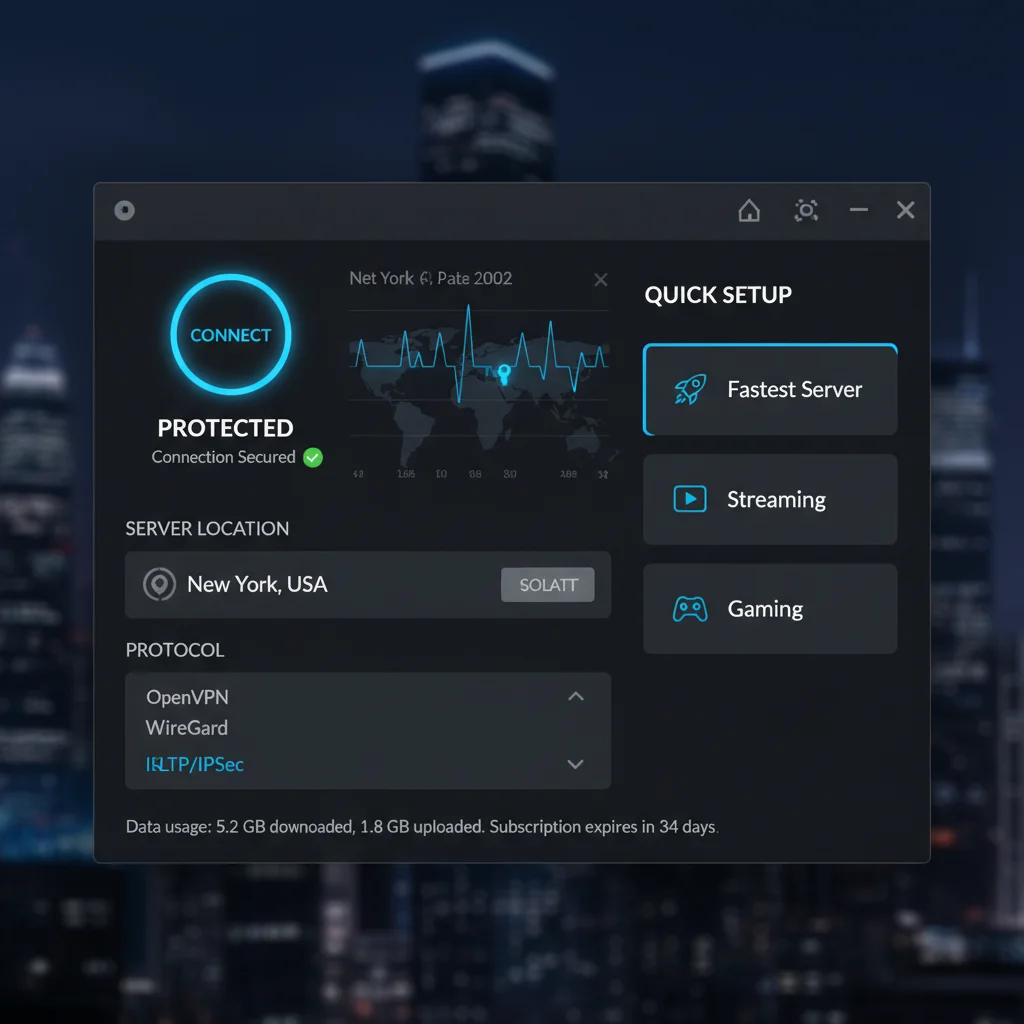
- Choose a Server Location: Most VPN apps feature a prominent ‘Connect’ button or a list of server locations. For optimal speed, choose a server geographically close to you. If you need to access geo-restricted content or resources, select a server in the relevant country. For accessing company resources, you might need to connect to a specific server provided by your IT department.
- Click ‘Connect’: Once you’ve selected your desired server, simply click the ‘Connect’ button. The application will establish an encrypted connection to the VPN server.
- Verify Connection: The VPN application will usually indicate a successful connection with a green light, a ‘Connected’ status, or a notification. You can also visit a website like
whatismyip.comto verify that your IP address has changed to that of the VPN server.
Basic Configuration for a Secure VPN Setup:
While many VPNs work perfectly with default settings, a few quick adjustments can enhance your secure VPN setup:
- Enable Kill Switch: Navigate to the VPN app’s settings or preferences and ensure the ‘Kill Switch’ feature is enabled. This critical feature ensures your internet connection is cut if the VPN unexpectedly drops, preventing your real IP address or data from being exposed.
- Enable Auto-Connect: For continuous protection, enable the ‘Auto-connect on startup’ or ‘Connect on launch’ option. This ensures the VPN automatically connects whenever you start your device, providing an always-on secure VPN setup.
- Choose a Protocol (Optional, but Recommended): In the settings, you might find options to select different VPN protocols (e.g., OpenVPN, WireGuard, IKEv2/IPSec). While the app’s default is usually good, WireGuard often offers a great balance of speed and security. If you’re unsure, ‘Automatic’ is generally safe, but researching the best protocol for your specific needs can optimize your secure VPN setup.
- DNS Leak Protection: Most reputable VPNs include DNS leak protection by default, but it’s worth checking the settings to ensure it’s active. This prevents your DNS requests from bypassing the VPN tunnel, further securing your online activities.
These steps should comfortably fit within the 5-minute timeframe, bringing you very close to a fully operational secure VPN setup for all your remote work needs.
Step 4: Advanced Tips for an Optimized and Secure VPN Setup (Remaining Minutes)
With the core setup complete, the remaining time can be used to fine-tune your secure VPN setup, ensuring maximum security, privacy, and performance for your remote work environment.
Regularly Update Your VPN Software
Just like any other software, VPN applications receive updates that include bug fixes, performance enhancements, and crucial security patches. Always keep your VPN client updated to ensure you’re running the latest version with the strongest protections. This is a simple yet vital aspect of maintaining a secure VPN setup.
Understand Split Tunneling
Some VPN services offer a feature called split tunneling. This allows you to choose which applications or websites use the VPN connection and which bypass it. For remote work, this can be incredibly useful. For instance, you might route all work-related traffic through the VPN for security, while allowing personal streaming services to use your regular internet connection to avoid potential speed reductions or geo-restrictions from the VPN server. This granular control enhances the flexibility of your secure VPN setup.
Utilize Multi-Factor Authentication (MFA)
If your VPN provider offers MFA for account login, enable it immediately. Adding an extra layer of security, such as a code from an authenticator app or a physical security key, significantly hardens your VPN account against unauthorized access, making your overall secure VPN setup more robust.
Consider Dedicated IP Addresses (For Specific Use Cases)
While most VPNs assign you a shared IP address, some providers offer dedicated IP addresses for an additional fee. A dedicated IP can be beneficial for remote workers who frequently access corporate networks that whitelist specific IP addresses, or for those who want to avoid CAPTCHAs and blacklists often associated with shared VPN IPs. This can streamline your access and make your secure VPN setup more seamless for specific work requirements.
Test Your VPN for Leaks
Even with a secure VPN setup, it’s good practice to periodically check for IP, DNS, and WebRTC leaks. Several online tools (e.g., ipleak.net, dnsleaktest.com) can help you verify that your VPN is effectively concealing your real IP address and routing all your traffic through the encrypted tunnel. If any leaks are detected, consult your VPN provider’s support or adjust your settings.
Be Mindful of Server Load
The performance of your VPN can be affected by the load on the server you’re connected to. If you experience slow speeds, try switching to a different server within the same region or a less congested one. Most VPN apps display server load or ping times, helping you choose the best option for your secure VPN setup.
Educate Yourself on Security Protocols
While you don’t need to be a cybersecurity expert, having a basic understanding of different VPN protocols (OpenVPN, WireGuard, IKEv2/IPSec) can help you make informed decisions about your settings. Each protocol has its strengths in terms of speed, security, and compatibility. For a truly secure VPN setup, OpenVPN (UDP) and WireGuard are generally considered excellent choices.
Troubleshooting Common VPN Issues
Even with a meticulous secure VPN setup, you might occasionally encounter minor issues. Here are some common problems and their quick fixes:
- Slow Connection Speeds: Try connecting to a different server, preferably one closer to your physical location or with lower load. Check your base internet speed without the VPN. Ensure your VPN software is up to date.
- Unable to Connect: Check your internet connection first. Try restarting the VPN application or your device. Temporarily disable your firewall or antivirus to see if they are interfering (remember to re-enable them). Try connecting to a different server.
- VPN Disconnects Frequently: This could be due to an unstable internet connection. Try switching VPN protocols in the app settings. Ensure your kill switch is enabled to prevent data leaks during disconnects.
- Accessing Specific Websites/Services: Some websites or online services actively block VPN IP addresses. Try clearing your browser’s cache and cookies, or switch to a different VPN server. For corporate resources, ensure you’re using the correct server and protocol specified by your IT department.
- DNS Leaks: Use an online tool to confirm a DNS leak. If one is detected, ensure DNS leak protection is enabled in your VPN settings. Contact your VPN provider’s support if the issue persists.
Most reputable VPN providers have extensive knowledge bases and 24/7 customer support to assist with any issues, ensuring your secure VPN setup remains reliable and effective.
Beyond the 15 Minutes: Ongoing VPN Maintenance and Best Practices
While the initial secure VPN setup can be completed quickly, maintaining its effectiveness requires ongoing vigilance and adherence to best practices. Think of your VPN as a digital shield; it needs to be regularly inspected and strengthened.
Regular Security Audits
Periodically review your VPN settings to ensure they align with the latest security recommendations. As new threats emerge, VPN providers often release updates that enhance security. Staying informed about these changes and applying them to your secure VPN setup is crucial.
Strong Passwords and Account Security
Your VPN account is a gateway to your online security. Use a strong, unique password and enable multi-factor authentication (MFA) if available. Never share your VPN account details with anyone.
Understand Your Company’s VPN Policy
If you’re using a VPN for remote work to access company resources, ensure you understand and comply with your organization’s IT security policies. They might have specific requirements for VPN usage, protocols, or server locations. Adhering to these guidelines is part of a responsible and secure VPN setup in a corporate context.
Be Wary of Free VPNs
While tempting, free VPN services often come with significant hidden costs, including collecting and selling your data, injecting ads, or offering weak encryption. For remote work, where sensitive data is involved, a free VPN is almost never a secure VPN setup solution. Always opt for a reputable, paid service.
Combine VPN with Other Security Measures
A VPN is a powerful tool, but it’s part of a broader cybersecurity strategy. Complement your secure VPN setup with other essential practices:
- Use a Firewall: Ensure your operating system’s firewall is enabled and properly configured.
- Antivirus/Anti-malware Software: Keep your security software updated and run regular scans.
- Strong Passwords and Password Manager: Use unique, complex passwords for all your online accounts and consider using a password manager.
- Regular Software Updates: Keep your operating system, web browsers, and all applications updated to patch security vulnerabilities.
- Be Phishing-Aware: Exercise caution with suspicious emails and links.
By integrating these practices with your secure VPN setup, you create a multi-layered defense against cyber threats, significantly enhancing your overall digital security posture.
Conclusion: Empowering Your Remote Work with a Secure VPN Setup
The journey to a truly effective and efficient remote work setup is incomplete without prioritizing cybersecurity. As we’ve explored, a secure VPN setup is not merely an optional add-on but a foundational element that safeguards your data, protects your privacy, and ensures uninterrupted access to essential resources.
We’ve demonstrated that achieving a robust secure VPN setup doesn’t require extensive technical knowledge or hours of configuration. By following our step-by-step guide, you can select a reliable VPN provider, install its software, and establish a secure connection in under 15 minutes. This quick deployment empowers you to focus on your work, knowing that your digital communications are encrypted and your online identity is protected.
Remember that while the initial setup is swift, ongoing vigilance and adherence to best practices are key to maintaining a consistently secure VPN setup. Regularly update your software, be mindful of your settings, and integrate your VPN usage with a broader cybersecurity strategy. The digital landscape is constantly evolving, and so too should your approach to online security.
Embrace the freedom and flexibility of remote work with confidence. By investing a small amount of time and effort into a secure VPN setup, you are not just protecting your data; you are investing in your peace of mind and professional integrity. Start today, and transform your remote workspace into a bastion of digital security.