The Best Password Managers of 2026: Security Features Compared Across 6 Top Apps
The Best Password Managers of 2026: Security Features Compared Across 6 Top Apps
In an increasingly interconnected digital world, the importance of robust cybersecurity cannot be overstated. Every day, we interact with dozens of online services, each requiring a unique set of credentials. Remembering complex, distinct passwords for every account is a Sisyphean task, often leading to password reuse – a critical security vulnerability. This is where the best password managers step in, offering a secure, efficient, and often indispensable solution to manage your digital identity.
As we navigate through 2026, the landscape of digital threats continues to evolve, making the choice of a password manager more crucial than ever. A good password manager not only stores your credentials securely but also generates strong, unique passwords, auto-fills login forms, and often includes additional security features like two-factor authentication (2FA) integration, secure note storage, and even dark web monitoring. This comprehensive guide will delve into six of the leading password managers available today, comparing their security features, usability, pricing, and unique selling points to help you make an informed decision.
Choosing the right password manager is not just about convenience; it’s about safeguarding your personal and financial information from sophisticated cyber threats. Whether you’re an individual looking to protect your personal accounts or a business seeking to enhance organizational security, understanding the nuances of each option is vital. Join us as we break down the contenders and reveal the best password managers for 2026.
Why You Need a Password Manager in 2026
The digital age has brought unparalleled convenience, but with it comes an increased risk of cyberattacks. Data breaches are a common occurrence, and if you’re reusing passwords, one compromised account can lead to a domino effect across all your online services. A strong, unique password for every account is your first line of defense, but managing hundreds of such passwords manually is practically impossible for most users.
The Perils of Password Reuse and Weak Passwords
- Account Takeovers: If a hacker obtains your password from one breached site and you’ve used that same password elsewhere, they can easily gain access to your other accounts.
- Phishing Attacks: Even if you’re careful, sophisticated phishing attempts can trick you into revealing credentials. A password manager can help identify legitimate sites and prevent auto-filling on fake ones.
- Brute-Force Attacks: Weak or common passwords are easily guessed by automated programs, making your accounts vulnerable. Password managers generate and store complex, random passwords that are extremely difficult to crack.
- Data Breaches: Major companies suffer data breaches regularly. While you can’t prevent these, a password manager ensures that if one of your accounts is compromised, the damage is contained because your other accounts use different, strong passwords.
Benefits of Using a Password Manager
The advantages of using a password manager extend far beyond simply remembering your passwords:
- Enhanced Security: Generates and stores strong, unique passwords for all your accounts, significantly reducing your vulnerability to common cyber threats.
- Convenience: Auto-fills login credentials, payment information, and personal details on websites and apps, saving you time and effort.
- Organization: Keeps all your digital credentials, secure notes, and other sensitive information organized in an encrypted vault.
- Secure Sharing: Many managers allow for secure sharing of passwords with trusted individuals or teams without revealing the actual password.
- Multi-Device Sync: Access your passwords securely across all your devices – desktops, laptops, tablets, and smartphones.
- Breach Monitoring: Some services actively monitor the dark web for your credentials and alert you if they are found, enabling you to take immediate action.
Ultimately, a password manager simplifies your digital life while dramatically improving your online security posture. It’s an essential tool for anyone serious about protecting their privacy and data in 2026.
Key Security Features to Look For
When evaluating the best password managers, security should be your paramount concern. While convenience is a significant factor, it should never come at the expense of robust protection. Here are the critical security features you must consider:
1. Encryption Standards
The bedrock of any secure password manager is its encryption. Look for managers that use industry-standard, strong encryption algorithms, most commonly AES-256 bit encryption. This level of encryption is virtually uncrackable with current technology. Ensure that your data is encrypted both at rest (when stored on servers or your device) and in transit (when syncing between devices).
2. Zero-Knowledge Architecture
A true zero-knowledge architecture means that your master password and encryption key are known only to you. The password manager company itself cannot access your vault or decrypt your data. This is a crucial privacy and security feature, as it means even if the company’s servers are breached, your sensitive information remains encrypted and inaccessible to attackers.
3. Two-Factor Authentication (2FA) Support
2FA adds an extra layer of security beyond your master password. Even if someone obtains your master password, they won’t be able to access your vault without the second factor (e.g., a code from an authenticator app, a fingerprint, or a hardware key). The best password managers offer a variety of 2FA options, including support for FIDO2/WebAuthn hardware keys.
4. Password Generator
A robust password generator is fundamental. It should be able to create long, complex, and truly random passwords that incorporate a mix of uppercase and lowercase letters, numbers, and symbols. The ability to customize password length and character types is also a plus.
5. Breach Monitoring and Security Audits
Some advanced password managers offer dark web monitoring, alerting you if your email addresses or other credentials appear in known data breaches. Regular independent security audits and certifications (e.g., SOC 2) demonstrate a provider’s commitment to maintaining high-security standards and identifying vulnerabilities.
6. Secure Sharing Capabilities
If you need to share passwords with family members or team members, ensure the password manager provides a secure, encrypted method for doing so. This prevents sending sensitive information through insecure channels like email or messaging apps.
7. Biometric Login
For convenience and an additional layer of security, support for biometric login (fingerprint or facial recognition) on compatible devices is highly desirable. This allows for quick and secure access to your vault without typing your master password every time.
8. Cross-Platform Compatibility
A good password manager should seamlessly integrate across all your devices and operating systems (Windows, macOS, Linux, Android, iOS) and popular web browsers (Chrome, Firefox, Edge, Safari). Consistent functionality and a unified user experience are key.
By prioritizing these security features, you can confidently choose a password manager that offers the highest level of protection for your digital life.
The Contenders: Top Password Managers of 2026
Now, let’s dive into the specifics of the six leading password managers that stand out in 2026, comparing their features, strengths, and potential drawbacks.
1. LastPass
LastPass is a veteran in the password management space, known for its user-friendly interface and comprehensive feature set. It offers both free and premium tiers, making it accessible to a wide audience.
Key Features:
- Secure Vault: Stores passwords, secure notes, and digital records with AES-256 bit encryption.
- Password Generator: Creates strong, random passwords.
- Auto-fill & Auto-login: Seamlessly fills credentials on websites and apps.
- Multi-Factor Authentication (MFA): Supports various 2FA methods, including authenticator apps and YubiKey.
- Secure Sharing: Allows sharing of individual passwords or folders with trusted users.
- Dark Web Monitoring (Premium): Alerts if your data is found in breaches.
- Emergency Access: Designate trusted contacts to access your vault in an emergency.
Pros:
- Intuitive interface, easy to get started.
- Robust free tier for basic password management.
- Excellent cross-platform compatibility.
- Comprehensive set of features for both individuals and families.
Cons:
- Past security incidents have raised concerns, though the company has made significant improvements.
- Free tier has limitations, such as device type restrictions for syncing.
2. 1Password
1Password is highly regarded for its strong security, elegant design, and focus on user experience. It’s particularly popular among Mac and iOS users but offers excellent support across all major platforms.
Key Features:
- Advanced Encryption: Uses AES-256 bit encryption with a strong focus on local encryption before syncing.
- Watchtower: Monitors for vulnerable passwords, compromised websites, and 2FA availability.
- Travel Mode: Temporarily removes sensitive vaults from your devices when crossing borders.
- Secure Document Storage: Stores and encrypts files and sensitive documents.
- Identity & Credit Card Storage: Securely stores personal details and payment information for auto-filling.
- Built-in Authenticator: Can generate and store 2FA codes directly within the app.
Pros:
- Exceptional security architecture and practices.
- Sleek, user-friendly interface across all devices.
- Comprehensive features for personal and business use.
- Excellent support for hardware 2FA keys.
Cons:
- No free tier (though a generous trial is available).
- Subscription model might be a barrier for some.
3. Bitwarden
Bitwarden stands out as a powerful open-source password manager, offering a robust feature set that often rivals its paid counterparts. It’s an excellent choice for privacy-conscious users and those looking for a cost-effective solution.
Key Features:
- Open-Source Codebase: Allows for community scrutiny and enhanced transparency.
- End-to-End Encryption: Uses AES-256 bit encryption, PBKDF2 SHA-256, and salted hashing.
- Free Tier: Offers a highly capable free version with unlimited password storage and sync across devices.
- Self-Hosting Option: Advanced users can host their own Bitwarden server for ultimate control.
- Secure Sharing: Organizations can securely share credentials.
- Two-Step Login: Supports various 2FA methods, including YubiKey, Duo, and FIDO2 (premium).
Pros:
- Excellent free tier with extensive features.
- Strong commitment to security and transparency through open-source.
- Affordable premium plans for advanced features.
- Highly customizable and flexible.
Cons:
- Interface might feel less polished than some competitors.
- Some advanced 2FA options are behind a paywall.
4. Dashlane
Dashlane is known for its intuitive design and a strong emphasis on user convenience, often integrating additional security tools beyond just password management. It’s a premium-focused service with a robust feature set.
Key Features:
- Patented Security Architecture: Employs AES-256 bit encryption and a zero-knowledge approach.
- VPN Included (Premium): Offers a built-in VPN for enhanced online privacy.
- Dark Web Monitoring & Alerts: Proactively checks for compromised data.
- Secure Storage: Stores passwords, secure notes, personal info, and payment details.
- Password Changer: Can automatically change multiple weak passwords with a single click on supported sites.
- Identity Dashboard: Provides an overview of your security health.
Pros:
- User-friendly interface and smooth experience.
- Valuable additional features like VPN and automatic password changer.
- Strong security and privacy focus.
Cons:
- Limited free version (up to 50 passwords on one device).
- Can be more expensive than some alternatives.
- Some users report occasional auto-fill issues.
5. KeePass
KeePass is a free, open-source, and highly customizable password manager primarily for desktop users. It requires a bit more technical know-how but offers unparalleled control over your data.
Key Features:
- Local Database Storage: Stores your encrypted password database locally on your computer.
- Open-Source: Fully transparent code, allowing for security audits by the community.
- Strong Encryption: Uses AES-256 and Twofish encryption algorithms.
- Plugins: Extensive plugin architecture allows for significant customization and extended functionality (e.g., cloud sync, advanced auto-typing).
- Portable: Can be run from a USB drive without installation.
Pros:
- Completely free and open-source.
- Ultimate control over your data (you choose where to store your database).
- Highly secure and customizable.
- No reliance on third-party servers for storage.
Cons:
- Steeper learning curve compared to commercial options.
- No built-in cloud sync; requires manual setup with third-party cloud services.
- Mobile app support is through third-party clients, which can vary in quality.
- Less polished interface.
6. NordPass
NordPass comes from the creators of NordVPN, bringing a strong emphasis on security and a user-friendly experience. It leverages advanced encryption and aims for simplicity.
Key Features:
- XChaCha20 Encryption: Uses a modern and highly secure encryption algorithm.
- Zero-Knowledge Architecture: Ensures only you can access your encrypted data.
- Data Breach Scanner: Checks if your email or passwords have been exposed online.
- Password Health: Identifies weak, old, or reused passwords.
- Secure Notes & Credit Card Storage: Beyond passwords, it secures other sensitive information.
- Emergency Access: Allows trusted contacts to access your vault in critical situations.
Pros:
- Excellent security with modern encryption.
- Clean, intuitive interface, easy to navigate.
- Reliable auto-fill functionality.
- Generous free tier with unlimited passwords and devices.
Cons:
- Newer to the market compared to some competitors, so less historical data.
- Some advanced features (like secure file storage) are still evolving.
- Pricing for premium plans can be competitive but might not always offer the same breadth of extra features as Dashlane.
Comparative Analysis: Choosing Your Ideal Password Manager
With a clearer understanding of each contender, let’s look at how they stack up against each other in key areas to help you identify the best password managers for your specific needs.
Security and Encryption
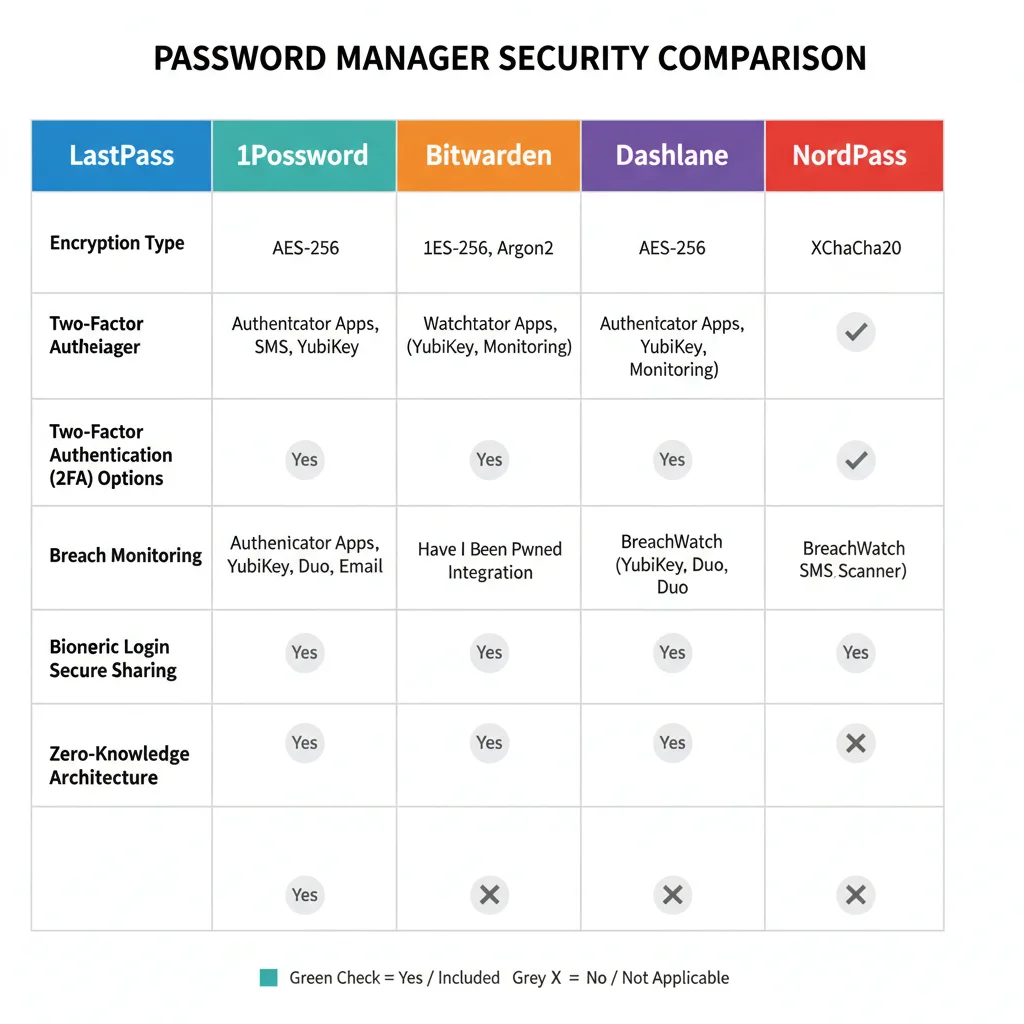
All six options utilize strong, industry-standard encryption (AES-256 or XChaCha20 for NordPass) and generally follow a zero-knowledge architecture. However, some nuances exist:
- 1Password & NordPass: Stand out for their rigorous security practices and modern encryption choices (1Password’s local-first encryption, NordPass’s XChaCha20).
- Bitwarden & KeePass: Benefit from open-source transparency, allowing for community audits and greater trust for many security professionals. KeePass offers ultimate local control.
- LastPass & Dashlane: Have robust security, but LastPass has faced past scrutiny, though they’ve worked to rebuild trust. Dashlane’s architecture is also highly regarded.
User Experience and Interface
Ease of use is crucial for widespread adoption and consistent security practices.
- 1Password & Dashlane: Generally considered the most polished and intuitive, offering a seamless experience across devices.
- LastPass & NordPass: Also offer very user-friendly interfaces, making them easy for beginners to pick up.
- Bitwarden: While functional, its interface is less sleek than the top-tier paid options but constantly improving.
- KeePass: Has the steepest learning curve, with a more utilitarian interface that requires more manual setup for features like cloud sync.
Features and Functionality
Beyond basic password storage, the extra features can significantly enhance your digital security and convenience.
- All: Offer core features like password generation, auto-fill, and secure notes.
- Dashlane: Differentiates itself with an included VPN and an innovative auto-password changer.
- 1Password: Excels with Watchtower, Travel Mode, and excellent document storage.
- NordPass: Provides a robust data breach scanner and password health reports.
- Bitwarden: Strong free tier and self-hosting options are major draws.
- KeePass: Its extensibility through plugins allows for a highly customized feature set, though it requires effort.
Pricing and Value
The cost often plays a significant role in the decision-making process.
- KeePass: Completely free. Best for those who prioritize cost savings and control over ease of use.
- Bitwarden & NordPass: Offer excellent free tiers, with affordable premium plans that unlock advanced 2FA and secure sharing. They represent exceptional value.
- LastPass: Has a solid free tier but restricts device types. Its premium plans are competitively priced.
- 1Password & Dashlane: Positioned as premium services with no robust free tier (though trials are available). They are generally more expensive but justify it with advanced features, polished interfaces, and strong security.
Who is Each Password Manager Best For?
- LastPass: Ideal for individuals and small teams looking for a balance of features, ease of use, and a solid free option to get started.
- 1Password: Perfect for users who prioritize top-tier security, a polished user experience, and comprehensive features, especially those in the Apple ecosystem or businesses.
- Bitwarden: The go-to for privacy advocates, open-source enthusiasts, and users seeking a powerful free solution or affordable premium features with self-hosting capabilities.
- Dashlane: Best for users who want an all-in-one security solution with a built-in VPN and automatic password changing, willing to pay for premium convenience.
- KeePass: Suited for technically proficient users who demand ultimate control over their data, prefer local storage, and are comfortable with manual configuration.
- NordPass: An excellent choice for users seeking modern encryption, a clean interface, and a generous free tier, particularly those already using Nord Security products.
Setting Up Your Chosen Password Manager: Best Practices
Once you’ve chosen the best password manager for your needs, proper setup and ongoing maintenance are crucial to maximizing its benefits.
1. Create a Strong Master Password
This is the single most important step. Your master password is the key to your entire vault. It must be:
- Long: At least 16 characters.
- Complex: A mix of uppercase, lowercase, numbers, and symbols.
- Unique: Never used anywhere else, ever.
- Memorable (to you): Consider using a passphrase (a string of unrelated words).
Write it down and store it in a physically secure location, or commit it to memory through a mnemonic technique. Do NOT store it digitally unless it’s in another secure, encrypted location.
2. Enable Two-Factor Authentication (2FA)
Activate 2FA for your password manager immediately. This adds a critical layer of security, ensuring that even if your master password is compromised, your vault remains protected.
- Authenticator Apps: Google Authenticator, Authy, Microsoft Authenticator are common choices.
- Hardware Keys: YubiKey or similar FIDO2/WebAuthn keys offer the highest level of 2FA security.
3. Import Existing Passwords (Carefully)
Most password managers offer tools to import passwords from browsers or other managers. While convenient, review the imported entries to ensure accuracy and delete any duplicates or outdated entries.
4. Update All Your Passwords
This is the most time-consuming but vital step. Use your new password manager’s generator to create strong, unique passwords for all your important accounts (email, banking, social media, e-commerce, etc.). Prioritize accounts with sensitive information. Aim to update 5-10 passwords daily until all are changed.
5. Secure Other Sensitive Information
Beyond passwords, use your vault to store:
- Secure notes (e.g., software licenses, Wi-Fi passwords, emergency contacts).
- Credit card details and banking information.
- Personal identification (driver’s license, passport details).
6. Practice Good Digital Hygiene
- Regular Audits: Periodically review your password health reports (if available) and update old or weak passwords.
- Beware of Phishing: Always double-check URLs before entering credentials. Your password manager should only auto-fill on legitimate sites.
- Keep Software Updated: Ensure your password manager app and browser extensions are always up-to-date to benefit from the latest security patches.
- Backups: For managers like KeePass, regularly back up your encrypted database to multiple secure locations (e.g., an encrypted USB drive, cloud storage).
The Future of Password Management
As we look beyond 2026, the landscape of authentication is continuously evolving. While password managers remain crucial, emerging technologies are set to reshape how we secure our digital lives.
Passkeys and FIDO Standards
Passkeys, built on FIDO (Fast Identity Online) standards, are gaining significant traction. These are cryptographic keys that allow you to log in to websites and apps without a traditional password. They are tied to your device (e.g., your smartphone’s biometric sensor) and offer a phishing-resistant, more secure, and often more convenient alternative to passwords. Many password managers are already integrating passkey management, allowing you to store and sync them securely across devices, blurring the lines between traditional password management and passwordless authentication.
Biometric Authentication Advancements
Improved facial recognition, fingerprint scanning, and even iris scanning are becoming more common and reliable. Password managers will increasingly leverage these biometrics for seamless and secure access to your vaults, reducing reliance on the master password for daily use.
AI and Machine Learning in Security
AI and machine learning are being integrated to detect anomalous login patterns, predict potential breaches, and enhance threat intelligence within password managers. This proactive approach can help users identify and mitigate risks before they materialize.
Decentralized Identity and Blockchain
While still in early stages, concepts like decentralized identity (DID) and blockchain-based authentication could offer new paradigms for managing digital identity, giving users more control over their personal data and reducing reliance on centralized identity providers. Password managers might evolve to support these decentralized credentials.
Despite these innovations, the core function of a password manager – securing and organizing your credentials – will remain vital for the foreseeable future. The best password managers will be those that adapt to these new technologies, integrating them seamlessly while maintaining their core commitment to robust security and user privacy.
Conclusion: Secure Your Digital Life Today
In 2026, a password manager is no longer a luxury; it’s a necessity for anyone who uses the internet. The sheer volume of online accounts and the increasing sophistication of cyber threats demand a proactive approach to digital security. By entrusting your credentials to one of the best password managers, you not only enhance your security posture but also simplify your online experience.
Whether you opt for the comprehensive features of 1Password or Dashlane, the open-source transparency of Bitwarden, the user-friendliness of LastPass or NordPass, or the ultimate control of KeePass, the most important step is to choose one and use it consistently. Each of these tools offers a robust solution to protect your digital life, generating strong, unique passwords and storing them in an impenetrable vault.
Take the time to evaluate your personal or organizational needs, consider the security features, user experience, and pricing, and invest in a password manager today. Your digital peace of mind is worth it. Start your journey towards a more secure online future now by embracing the power of the best password managers.
Related Posts: