Top 5 Project Management Apps for Small Businesses 2026: A Feature-by-Feature Breakdown

In the dynamic landscape of 2026, small businesses face unprecedented challenges and opportunities. To thrive, efficiency, collaboration, and strategic planning are not just buzzwords; they are necessities. This is where robust Small Business Project Management Apps come into play. The right project management tool can be the backbone of your operations, transforming chaotic workflows into streamlined success stories. But with a myriad of options available, how do you choose the best fit for your unique business needs? This comprehensive guide will break down the top 5 project management apps for small businesses in 2026, offering a feature-by-feature comparison to help you make an informed decision.
Gone are the days when project management software was exclusively for large enterprises with hefty budgets. Today, the market is flooded with powerful, user-friendly, and often affordable solutions tailored specifically for small and medium-sized businesses (SMBs). These tools are designed to enhance team collaboration, track progress, manage resources, and ensure projects are delivered on time and within budget. Our focus here is on identifying applications that excel in scalability, ease of use, integration capabilities, and, most importantly, provide significant value to small business owners and their teams.
The goal of this article is to equip you with the knowledge to select a project management app that not only meets your current demands but also scales with your growth. We’ll delve into the core functionalities, unique selling points, and potential drawbacks of each contender, ensuring you have a holistic view before committing to a solution. So, let’s embark on this journey to discover the ultimate Small Business Project Management Apps that will define productivity in 2026.
The Crucial Role of Project Management Apps for Small Businesses
For a small business, every minute and every dollar count. Manual tracking, scattered communication, and unclear responsibilities can quickly derail even the most promising projects. This is precisely why Small Business Project Management Apps are indispensable. They provide a centralized hub for all project-related activities, fostering transparency and accountability across the team. Imagine a scenario where every team member knows their tasks, deadlines, and how their work contributes to the larger objective – that’s the power of effective project management software.
Boosting Efficiency and Productivity
One of the primary benefits of using a dedicated project management app is the significant boost in efficiency and productivity. These tools automate repetitive tasks, provide clear visual representations of project progress, and reduce the time spent on administrative overhead. Instead of sifting through emails or attending endless meetings, teams can focus on core tasks, knowing that all relevant information is readily accessible within the app. This streamlined approach directly translates to quicker project completion and higher output, which is vital for any small business looking to compete in a fast-paced market.
Enhancing Collaboration and Communication
Effective collaboration is the cornerstone of successful projects. Small Business Project Management Apps facilitate seamless communication by offering features like in-app messaging, file sharing, comment sections on tasks, and notification systems. This ensures that everyone is on the same page, feedback is easily exchanged, and potential roadblocks are identified and addressed proactively. Remote teams, in particular, benefit immensely from these features, as they bridge geographical distances and create a cohesive working environment.
Better Resource Allocation and Budget Management
Small businesses often operate with limited resources, making efficient allocation crucial. Project management apps provide insights into team workload, allowing managers to distribute tasks evenly and prevent burnout. Many also include features for tracking expenses, managing budgets, and forecasting resource needs, helping businesses stay within financial constraints and avoid unexpected costs. This level of financial oversight is invaluable for sustainable growth.
Improved Decision-Making with Data-Driven Insights
The best Small Business Project Management Apps offer robust reporting and analytics capabilities. These insights allow business owners to track key performance indicators (KPIs), identify bottlenecks, and understand what’s working and what’s not. Data-driven decision-making leads to continuous process improvement, helping small businesses optimize their strategies and achieve better outcomes in future projects. This proactive approach to management is a game-changer for long-term success.
Criteria for Selecting the Best Small Business Project Management Apps
Before we dive into the top contenders, it’s essential to understand the criteria we used to evaluate these Small Business Project Management Apps. Not all apps are created equal, and what works for one business might not work for another. Our selection process focused on several key areas that are particularly important for small businesses:
- Ease of Use: Small businesses often don’t have dedicated IT support. The chosen app must be intuitive, easy to set up, and require minimal training.
- Core Project Management Features: Essential features include task management, scheduling, collaboration tools, file sharing, and progress tracking.
- Scalability: The app should be able to grow with your business, accommodating more users and complex projects without requiring a complete system overhaul.
- Integration Capabilities: Seamless integration with other commonly used business tools (e.g., accounting software, communication platforms, CRM) is crucial.
- Affordability: Cost-effectiveness is a major factor for small businesses. We looked for apps that offer strong features at competitive price points, including free tiers or affordable plans.
- Reporting and Analytics: The ability to generate insightful reports on project status, team performance, and resource utilization is highly valued.
- Customer Support: Responsive and helpful customer support is vital for troubleshooting and maximizing the app’s potential.
Keeping these criteria in mind, let’s explore the top 5 Small Business Project Management Apps for 2026.
Top 5 Project Management Apps for Small Businesses in 2026
1. Asana: The Versatile Collaborator
Asana has long been a favorite among teams of all sizes, and for good reason. Its intuitive interface and powerful features make it an excellent choice for Small Business Project Management Apps. Asana excels in task management, allowing users to create, assign, and track tasks with ease. It offers multiple project views, including list, board (Kanban), calendar, and timeline (Gantt chart), catering to different preferences and project types.
Key Features:
- Task Management: Detailed task creation with subtasks, due dates, assignees, and attachments.
- Multiple Views: List, Board, Calendar, and Timeline views for flexible project visualization.
- Workflows: Custom workflow automation to streamline repetitive processes.
- Communication: In-task comments, project conversations, and team messaging.
- Integrations: Extensive integrations with popular tools like Slack, Google Drive, Microsoft Teams, Zoom, and Salesforce.
- Reporting: Project dashboards and custom report building for insights into progress and team performance.
Pros for Small Businesses:
- Highly flexible and customizable to various project methodologies.
- Excellent for team collaboration and communication.
- Generous free tier for small teams (up to 15 users).
- Visually appealing and user-friendly interface.
Cons for Small Businesses:
- Advanced features like portfolio management can be costly.
- Can feel overwhelming for very small teams or individual users initially.
- Limited native time tracking (relies on integrations).
2. Trello: The Agile Powerhouse
Trello, powered by its iconic Kanban board interface, is a fantastic option for small businesses that prefer a visual and agile approach to project management. Its simplicity and flexibility make it one of the most accessible Small Business Project Management Apps on the market. Trello uses boards, lists, and cards to represent projects, stages, and tasks, respectively, making it incredibly easy to visualize workflows and track progress.
Key Features:
- Kanban Boards: Intuitive drag-and-drop interface for task management.
- Cards: Detailed cards for tasks with checklists, due dates, attachments, and comments.
- Power-Ups: Integrations with various apps (e.g., Slack, Google Drive, Calendar) to extend functionality.
- Automation: Basic automation rules (Butler) to streamline repetitive actions.
- Templates: Pre-built templates for various project types.
Pros for Small Businesses:
- Extremely easy to learn and use, even for non-tech-savvy teams.
- Highly visual and great for agile methodologies.
- Excellent free tier with unlimited boards, cards, and lists.
- Affordable paid plans for advanced features.
Cons for Small Businesses:
- May lack advanced reporting and complex project planning features compared to others.
- Less suitable for traditional, linear project management with Gantt charts (though Power-Ups can add this).
- Can become cluttered with too many cards if not managed well.
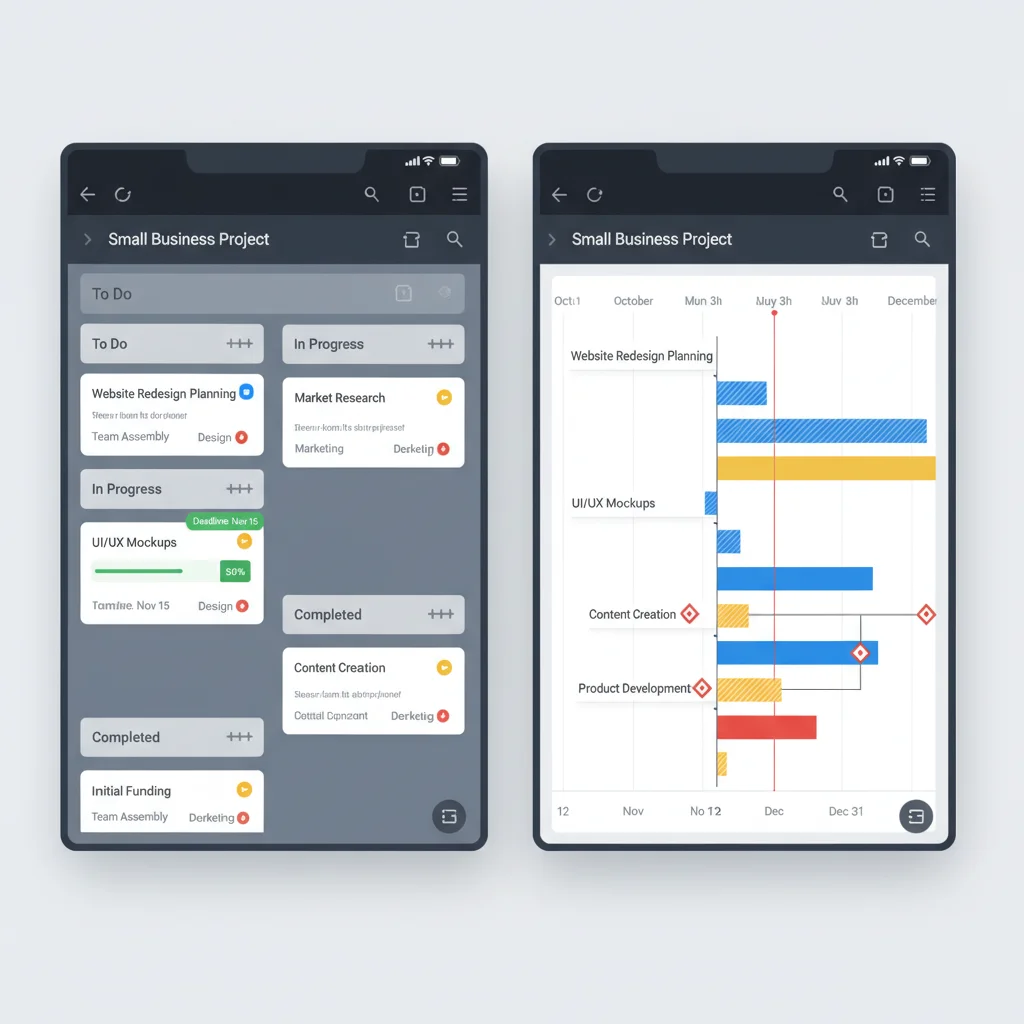
3. Monday.com: The Customizable Work OS
Monday.com positions itself as a ‘Work OS’ (Operating System), offering a highly customizable platform that goes beyond traditional project management. Its colorful and visually engaging interface makes it appealing, and its flexibility allows it to adapt to almost any workflow, making it a strong contender among Small Business Project Management Apps. It’s particularly good for businesses that need to manage a variety of different types of work, not just projects.
Key Features:
- Customizable Boards: Build workflows for projects, marketing campaigns, HR, and more.
- Multiple Views: Table, Kanban, Gantt, Calendar, Form, and Workload views.
- Automation: Robust automation capabilities to streamline tasks and notifications.
- Collaboration: In-context communication, file sharing, and notification center.
- Integrations: Connects with hundreds of apps like Salesforce, HubSpot, Gmail, and Microsoft Excel.
- Reporting & Dashboards: Customizable dashboards to visualize project progress, team workload, and key metrics.
Pros for Small Businesses:
- Incredibly versatile and adaptable to diverse business needs.
- Visually appealing and intuitive interface.
- Strong automation features reduce manual effort.
- Excellent for centralizing various types of work beyond just projects.
Cons for Small Businesses:
- Can be more expensive than other options, especially for larger teams.
- The sheer number of features might be overwhelming for absolute beginners.
- Pricing structure can be complex to navigate.
4. ClickUp: The All-in-One Productivity Hub
ClickUp aims to be the ‘one app to replace them all,’ offering an extensive suite of features designed to cater to every aspect of project management and team productivity. For small businesses looking for a comprehensive solution without having to piece together multiple tools, ClickUp stands out as a powerful option among Small Business Project Management Apps. It offers unparalleled customization and a wide array of views.
Key Features:
- Highly Customizable: Custom statuses, fields, and views to match any workflow.
- Multiple Views: List, Board, Calendar, Gantt, Box, Table, Workload, Map, and more.
- Task Management: Priority levels, assignees, subtasks, checklists, and dependencies.
- Time Tracking: Native time tracking capabilities built into tasks.
- Goals & OKRs: Set and track business goals and Objectives and Key Results.
- Integrations: Connects with over 1,000 tools, including Slack, Google Drive, GitHub, and Zoom.
- Reporting: Robust reporting features and customizable dashboards.
Pros for Small Businesses:
- Extremely feature-rich, potentially eliminating the need for other tools.
- Highly customizable to fit specific team needs and workflows.
- Generous free plan with many core features.
- Excellent for scaling as your business grows.
Cons for Small Businesses:
- Can have a steep learning curve due to the abundance of features.
- Some users report performance issues with very large workspaces.
- The interface can feel cluttered at times.
5. Wrike: The Enterprise-Grade Solution for Growing SMBs
Wrike offers a robust, enterprise-grade solution that is also scalable enough to benefit growing small businesses. It’s particularly well-suited for businesses that require advanced reporting, complex project structures, and strong security features. Wrike provides a 360-degree view of all projects, making it a powerful contender for Small Business Project Management Apps that anticipate significant growth and require sophisticated oversight.
Key Features:
- Advanced Task Management: Dependencies, critical path, custom workflows, and task approvals.
- Gantt Charts & Timelines: Interactive Gantt charts for detailed project scheduling and tracking.
- Resource Management: Workload management and resource allocation tools.
- Reporting & Analytics: Customizable performance reports, time tracking reports, and budget tracking.
- Collaboration: Real-time collaboration, file proofing, and shared dashboards.
- Integrations: Connects with over 400 applications, including Salesforce, Adobe Creative Cloud, and Microsoft Office 365.
Pros for Small Businesses:
- Powerful for complex project planning and execution.
- Excellent reporting and analytics capabilities.
- Strong security features and enterprise-grade reliability.
- Scalable for businesses with future growth in mind.
Cons for Small Businesses:
- Can be more expensive than other options, especially for smaller teams.
- Steeper learning curve due to its extensive features.
- The interface might feel less intuitive for beginners compared to Trello or Asana.

Choosing the Right Small Business Project Management App: A Decision Framework
With five excellent options laid out, the next step is to determine which of these Small Business Project Management Apps is the perfect fit for your organization. This isn’t a one-size-fits-all decision. Your choice should align with your business’s specific needs, team size, project complexity, and budget. Here’s a framework to guide your decision-making process:
1. Assess Your Core Needs and Priorities
Start by making a list of your most critical requirements. Are you primarily looking for a tool to manage simple task lists and improve communication? Or do you need advanced features like resource management, complex dependencies, and detailed reporting? Understanding your priorities will help you narrow down the options.
- For simple task management and visual workflows: Trello is an excellent choice. Its Kanban-style boards are perfect for agile teams or those who prefer a highly visual approach.
- For balanced task management, collaboration, and some automation: Asana offers a great mix of features with an intuitive interface, suitable for diverse project types.
- For highly customizable workflows and a ‘Work OS’ approach: Monday.com excels in adaptability, making it suitable for businesses with varied operational needs beyond just projects.
- For an all-in-one comprehensive solution with extensive features: ClickUp is unmatched in its feature set, ideal for businesses wanting to consolidate multiple tools into one platform.
- For growing businesses needing enterprise-grade features and robust reporting: Wrike provides sophisticated project planning, resource management, and detailed analytics for more complex operations.
2. Consider Your Team Size and Technical Proficiency
The size and technical comfort level of your team play a significant role. A small team with limited technical expertise will benefit more from a tool that is easy to learn and use, while a larger, more tech-savvy team might appreciate the depth of features offered by more complex platforms.
- Small, less tech-savvy teams: Trello’s simplicity is a major advantage.
- Medium-sized teams with varying tech skills: Asana provides a good balance of power and ease of use.
- Teams comfortable with customization and learning new systems: ClickUp or Monday.com can offer immense value.
- Teams needing robust control and detailed planning: Wrike’s comprehensive features will be beneficial.
3. Evaluate Your Budget
Pricing models vary significantly among Small Business Project Management Apps. Most offer free tiers, basic paid plans, and enterprise-level subscriptions. Carefully compare the features offered at each price point and consider your long-term budget. Remember to factor in the cost per user and any add-ons you might need.
- Looking for a free or very affordable solution: Trello and Asana offer excellent free tiers. ClickUp also has a generous free plan.
- Willing to invest for advanced features and scalability: Monday.com and Wrike typically have higher price points but offer more comprehensive solutions.
4. Test Drive with Free Trials
Almost all reputable Small Business Project Management Apps offer free trials. This is arguably the most crucial step. Gather a small team and test out your top 2-3 choices with a real, albeit small, project. Pay attention to:
- How intuitive the interface feels.
- The ease of setting up tasks and projects.
- The effectiveness of collaboration features.
- The clarity of reporting.
- How well it integrates with your existing tools.
User feedback from your team during the trial period is invaluable. What might seem perfect on paper could have usability issues for your specific team.
5. Consider Integration with Existing Tools
Your chosen project management app shouldn’t operate in a silo. It should seamlessly integrate with other essential business tools you already use, such as communication platforms (Slack, Microsoft Teams), cloud storage (Google Drive, Dropbox), CRM systems, and accounting software. Good integrations minimize data silos and ensure a smooth workflow across your entire tech stack.
Future-Proofing Your Small Business with the Right App
Investing in the right Small Business Project Management Apps is not just about solving today’s problems; it’s about building a foundation for future growth. As your business expands, your project management needs will evolve. The app you choose should be able to adapt to these changes without forcing you to switch platforms entirely. Look for scalability in user capacity, feature sets, and integration possibilities.
The landscape of project management tools is constantly evolving, with new features and AI-driven capabilities emerging regularly. While we’ve highlighted the top contenders for 2026, it’s always wise to stay informed about industry trends. However, the core principles of effective project management remain constant: clear communication, organized tasks, efficient resource allocation, and insightful reporting. The apps discussed here excel in these fundamental areas, providing a solid framework for small business success.
Ultimately, the best project management app is the one that your team will actually use consistently and effectively. It should simplify their work, not complicate it. It should empower them to collaborate seamlessly and contribute to the collective success of your projects. By carefully considering your needs and leveraging the insights from this feature-by-feature breakdown, you are well on your way to selecting a Small Business Project Management App that will drive your company forward in 2026 and beyond.
Conclusion: Empowering Your Small Business for 2026 and Beyond
The journey to finding the perfect project management app for your small business in 2026 can seem daunting, but with the right information and a clear understanding of your needs, it becomes a strategic decision that will yield significant returns. We’ve explored five leading Small Business Project Management Apps – Asana, Trello, Monday.com, ClickUp, and Wrike – each offering a unique blend of features, strengths, and suitability for different business contexts.
Whether you prioritize simplicity and visual task tracking with Trello, seek a balanced and versatile solution like Asana, desire the extreme customization of Monday.com, need an all-encompassing productivity hub like ClickUp, or require the robust, enterprise-grade capabilities of Wrike for complex growth, there’s an app tailored for you. The key is to match the app’s strengths with your business’s specific operational requirements, team dynamics, and budget constraints.
Remember that the true power of these tools lies not just in their features, but in how effectively they are adopted and utilized by your team. A successful implementation will lead to improved communication, enhanced productivity, better resource management, and ultimately, more successful project outcomes. By making an informed choice today, you are investing in the future efficiency and growth of your small business, ensuring it remains competitive and agile in the years to come.
Embrace the power of modern project management technology. Choose the Small Business Project Management App that best empowers your team to achieve their full potential, streamlines your workflows, and transforms your aspirations into tangible achievements. The right tool isn’t just software; it’s a strategic partner in your business’s success story.