Project Management Tools 2026: Jira vs Asana vs Trello for Agile Teams

Project Management Tools for Agile Teams: Comparing Jira vs. Asana vs. Trello in 2026, Highlighting Scrum Features
In the fast-evolving world of software development and project management, selecting the right set of agile project tools is paramount for success. As we navigate through 2026, the landscape of project management software continues to offer a plethora of options, each promising enhanced efficiency, better collaboration, and streamlined workflows. Among the giants in this domain, Jira, Asana, and Trello stand out as perennial contenders, each with its unique strengths and weaknesses. For agile teams, particularly those adhering to Scrum methodologies, the choice becomes even more critical. This comprehensive guide aims to dissect these three powerful platforms, comparing their features, pricing, integration capabilities, and most importantly, their effectiveness in supporting Scrum and broader agile frameworks.
The decision of which tool to adopt isn’t merely about ticking off features on a checklist; it’s about finding a symbiotic relationship between the tool and your team’s specific needs, culture, and the nature of the projects undertaken. A well-chosen tool can significantly boost productivity, foster transparency, and empower teams to deliver high-quality products faster. Conversely, a mismatched tool can lead to frustration, inefficiencies, and ultimately, project failures. Therefore, understanding the nuances of Jira, Asana, and Trello in the context of agile project tools is not just beneficial, but essential for any forward-thinking organization in 2026.
The Evolving Landscape of Agile Project Tools in 2026
The year 2026 brings with it new challenges and opportunities in project management. Artificial intelligence (AI) and machine learning (ML) are no longer futuristic concepts but integral components of many agile project tools. Predictive analytics, automated reporting, and intelligent task assignments are becoming standard expectations. Furthermore, the increasing prevalence of remote and hybrid work models has amplified the need for robust cloud-based solutions that facilitate seamless collaboration across geographical boundaries. Security and data privacy have also taken center stage, with organizations demanding higher standards from their software providers.
Agile methodologies, particularly Scrum, continue to dominate the software development landscape, extending their reach into various other industries. This necessitates agile project tools that are not just adaptable but inherently designed to support sprints, backlogs, daily stand-ups, and retrospectives. The ideal tool should provide clear visibility into project progress, facilitate quick iterations, and enable continuous feedback loops. As we delve into Jira, Asana, and Trello, we will assess how well they have adapted to these evolving demands and what new functionalities they offer to stay competitive in 2026.
Jira: The Powerhouse for Software Development Teams
Overview and Core Strengths
Jira, developed by Atlassian, remains the undisputed king for software development teams practicing agile methodologies. Its robust feature set is specifically tailored for Scrum, Kanban, and other agile frameworks, making it a go-to choice for complex projects. In 2026, Jira has further solidified its position by enhancing its AI-driven insights, offering more sophisticated automation rules, and improving its integration ecosystem.
Jira’s strength lies in its ability to handle intricate workflows, detailed issue tracking, and comprehensive reporting. It allows teams to define custom workflows, issue types (e.g., stories, epics, bugs), and fields, providing unparalleled flexibility. This level of customization ensures that Jira can be molded to fit almost any development process, no matter how unique or complex. For large enterprises with multiple development teams, Jira offers a centralized platform for managing portfolios, dependencies, and releases across various projects.
Scrum Features in Jira (2026)
For Scrum teams, Jira provides a dedicated set of features that are hard to match:
- Scrum Boards: Visualizing sprint backlogs, work in progress, and completed tasks with customizable columns.
- Product Backlog Management: Easy creation, prioritization, and estimation of user stories and epics. Teams can drag and drop items to reorder the backlog and break down larger tasks into smaller, manageable ones.
- Sprint Planning: Tools to plan sprints, allocate story points, and monitor sprint velocity. Jira’s sprint reporting helps teams understand their capacity and improve future sprint planning.
- Burndown/Burnup Charts: Essential for tracking sprint progress and identifying potential roadblocks early. These charts offer real-time insights into remaining work and team performance.
- Retrospective Support: While not a direct feature, Jira’s extensive reporting and historical data provide valuable insights for retrospective meetings, helping teams identify areas for improvement.
- Advanced Roadmaps: For larger organizations, Jira’s Advanced Roadmaps (formerly Portfolio for Jira) allows for strategic planning across multiple teams and projects, aligning work with organizational goals. This is crucial for scaling agile practices.
- Automations: Enhanced automation capabilities in 2026 allow teams to automate routine tasks like assigning issues, updating statuses, and sending notifications, freeing up valuable time for development.
Integrations and Ecosystem
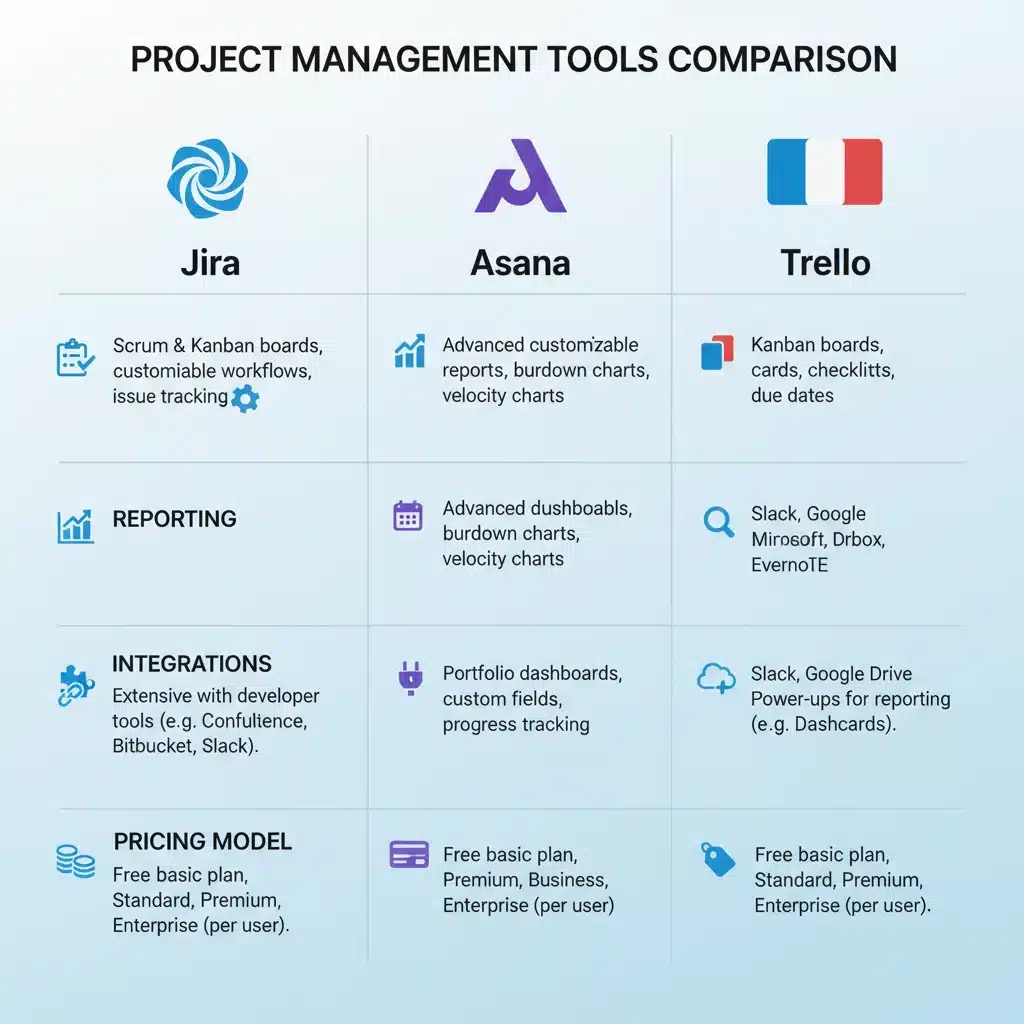
Jira boasts an extensive marketplace with thousands of apps and integrations, covering everything from version control (Bitbucket, GitHub) and CI/CD (Jenkins, Bamboo) to communication (Slack, Microsoft Teams) and testing tools. This rich ecosystem allows teams to create a highly integrated development environment, minimizing context switching and maximizing efficiency. Atlassian’s own suite of products, including Confluence for documentation and Bitbucket for code management, integrates seamlessly with Jira, offering a comprehensive solution for the entire software development lifecycle.
Pricing and Target Audience
Jira offers various pricing tiers, from a free plan for small teams (up to 10 users) to enterprise-level subscriptions. The pricing scales with the number of users and required features, making it accessible for startups while also catering to the complex needs of large organizations. Its primary target audience remains software development teams, IT operations, and product management teams who require a high degree of customization, robust reporting, and deep agile support. However, its flexibility allows it to be adapted for various other project types as well.
Asana: The All-Rounder for Cross-Functional Teams
Overview and Core Strengths
Asana has evolved into a formidable competitor in the project management space, particularly favored by marketing, operations, product, and general business teams. While not as specialized for software development as Jira, Asana excels in providing a highly intuitive user experience, versatile task management, and powerful workflow automation. In 2026, Asana has focused on enhancing its AI-powered insights for workload management and predictive scheduling, alongside expanding its template library for various business functions.
Asana’s strength lies in its ability to manage diverse projects with ease, offering multiple views (list, board, timeline, calendar) to suit different preferences. Its clean interface and user-friendly design make it quick to adopt, even for users new to project management software. Asana promotes clarity on who is doing what by when, which is crucial for cross-functional collaboration and accountability.
Scrum Features in Asana (2026)
While Asana doesn’t explicitly brand its features as ‘Scrum-specific’ in the same way Jira does, it provides ample functionality to support agile practices:
- Boards (Kanban-style): Teams can create boards to visualize sprint backlogs, track task progress through different stages (e.g., To Do, In Progress, Done), and conduct daily stand-ups effectively.
- Custom Fields: Allows teams to add custom fields for story points, priority levels, and sprint numbers, enabling a more tailored agile workflow.
- Timeline View (Gantt-like): Useful for visualizing project dependencies and overall sprint schedules, helping teams plan and track their iterations.
- Workload Management: Asana’s workload feature helps managers understand team capacity, prevent burnout, and allocate tasks more effectively across sprints. This is particularly enhanced with AI in 2026 for more accurate predictions.
- Rules and Automations: Teams can set up rules to automate routine tasks, such as assigning tasks, updating statuses, and notifying team members, which can be configured to support sprint processes.
- Reporting: Asana offers customizable dashboards and reporting features to track project progress, identify bottlenecks, and monitor team performance, providing data for sprint reviews and retrospectives.
- Goals and Portfolios: For strategic alignment, Asana allows organizations to set and track company goals, connecting individual tasks and projects to larger objectives, which is beneficial for product roadmapping in an agile context.
Integrations and Ecosystem
Asana integrates with a wide array of popular business tools, including Slack, Google Workspace, Microsoft Office 365, Salesforce, Adobe Creative Cloud, and many more. This extensive integration capability ensures that Asana can fit seamlessly into an existing tech stack, enhancing collaboration and data flow. Its open API also allows for custom integrations, providing further flexibility for specific business needs.
Pricing and Target Audience
Asana offers a free basic plan for individuals and small teams, with paid tiers providing advanced features like timelines, portfolios, and workload management. Its pricing structure is competitive and scales with the number of users and required functionalities. Asana is ideal for marketing teams, operations, product management, HR, and any cross-functional teams that need a flexible, intuitive, and visually appealing tool to manage projects and track tasks. While it can support agile development, it’s generally preferred by teams where the technical complexity is not as high as in pure software engineering.
Trello: The Intuitive Kanban Board for Simplicity
Overview and Core Strengths
Trello, also an Atlassian product, revolutionized task management with its highly visual and intuitive Kanban board interface. It’s known for its simplicity, ease of use, and flexibility, making it a favorite for small teams, personal task management, and projects that prioritize visual workflow. In 2026, Trello continues to focus on enhancing its core Kanban experience with more powerful automation (Butler), improved board intelligence, and deeper integrations with the Atlassian suite and other popular tools.
Trello’s strength lies in its simplicity and visual appeal. Boards, lists, and cards make it incredibly easy to grasp and use, even for non-technical users. It’s perfect for visualizing workflows, tracking progress, and fostering clear communication within a team. Its drag-and-drop functionality for moving cards between lists mimics physical whiteboards, making the digital transition effortless.
Scrum Features in Trello (2026)
While Trello is not inherently designed for Scrum in the same way Jira is, its flexibility allows teams to adapt it to support agile practices:
- Kanban Boards for Sprints: Each list can represent a sprint stage (e.g., Backlog, Sprint 1, In Progress, Done), and cards can be user stories or tasks. This provides a clear visual representation of sprint progress.
- Card Details: Cards can include descriptions, checklists, due dates, attachments, and comments, allowing for detailed task management within a sprint.
- Labels: Customizable labels can be used to categorize tasks by priority, type (e.g., bug, feature), or story points, aiding in backlog refinement and sprint planning.
- Power-Ups (Integrations): Trello’s Power-Ups extend its functionality significantly. Teams can add Power-Ups for features like custom fields, burndown charts (via third-party integrations), calendar views, and even basic reporting. This allows teams to bolt on agile-specific functionalities as needed.
- Butler Automation: Trello’s built-in automation tool, Butler, allows teams to create rules, buttons, and scheduled commands to automate repetitive actions on boards and cards. This can be used to automate sprint-related tasks, such as moving cards, assigning members, or setting due dates based on certain triggers.
- Checklists: Can be used within cards to break down larger user stories into smaller, manageable sub-tasks, ensuring all components of a story are addressed.

Integrations and Ecosystem
Trello’s Power-Ups are its gateway to a vast ecosystem of integrations. It integrates with popular tools like Slack, Google Drive, Dropbox, Salesforce, GitHub, and many more. While not as deeply integrated for complex software development processes as Jira, its integrations cover a broad spectrum of business needs, making it a versatile tool for various departments. The Atlassian connection also means seamless linking with Jira and Confluence for teams that use both.
Pricing and Target Audience
Trello offers a generous free plan with unlimited boards, lists, and cards, making it an excellent choice for individuals and small teams. Paid plans (Standard, Premium, Enterprise) unlock features like unlimited Power-Ups, advanced checklists, custom fields, and enhanced automation. Trello is ideal for teams that prefer a visual approach to project management, including marketing, event planning, content creation, HR, and small software development teams with less complex requirements. It’s also widely used for personal productivity and side projects due to its ease of use.
Key Comparison: Jira vs. Asana vs. Trello for Agile Project Tools
To provide a clearer picture, let’s compare these agile project tools across several critical dimensions in 2026:
1. Agile and Scrum Support
- Jira: Unrivaled. Built from the ground up for software development and agile methodologies. Offers dedicated Scrum boards, backlog management, sprint planning, burndown charts, and powerful reporting. Best for strict Scrum implementations.
- Asana: Good. Highly adaptable for agile. Supports Kanban-style boards, custom fields for agile metrics, and robust workload management. Can be configured for Scrum, but requires more manual setup and doesn’t have native Scrum-specific terminology or reports like Jira.
- Trello: Basic to Moderate. Excellent for visual Kanban. Can be adapted for Scrum with Power-Ups and creative use of lists and cards. Ideal for simpler agile workflows or teams that prioritize visual simplicity over deep, native agile features.
2. Complexity and Learning Curve
- Jira: High. Its extensive features and customization options come with a steeper learning curve. Requires dedicated time to set up and master, especially for complex workflows.
- Asana: Moderate. User-friendly interface, but its breadth of features can still take some time to fully explore. Generally easier to adopt than Jira.
- Trello: Low. Exceptionally easy to learn and use. Its visual, drag-and-drop interface is intuitive for almost anyone.
3. Customization and Flexibility
- Jira: Very High. Highly customizable workflows, issue types, fields, and permissions. Can be tailored to almost any process.
- Asana: High. Offers custom fields, multiple project views, and flexible task structures. Good for adapting to various team needs.
- Trello: Moderate. Customizable boards, lists, and cards. Power-Ups extend functionality, but core customization is simpler than Jira or Asana.
4. Reporting and Analytics
- Jira: Excellent. Comprehensive reporting for agile metrics (velocity, burndown, control charts), project progress, and team performance.
- Asana: Good. Offers customizable dashboards and reports to track project status, workload, and task completion. Enhanced with AI in 2026 for predictive analytics.
- Trello: Basic. Native reporting is limited. Relies heavily on Power-Ups for advanced analytics and metrics.
5. Integrations
- Jira: Extensive. Vast marketplace with deep integrations, especially within the Atlassian ecosystem and development tools.
- Asana: Extensive. Integrates with a broad range of business and productivity tools.
- Trello: Extensive via Power-Ups. Connects with many popular apps, but integrations might not be as deep as Jira for development-specific tools.
6. Scalability
- Jira: Excellent. Built for enterprise-level usage, handling thousands of users and complex portfolios.
- Asana: Good. Scales well for large organizations, especially for managing cross-functional projects and company-wide initiatives.
- Trello: Moderate. Can scale for larger teams, but its simplicity might become a limitation for highly complex, interconnected projects at an enterprise scale without significant reliance on Power-Ups and careful board organization.
Choosing the Right Agile Project Tool for Your Team in 2026
The ‘best’ agile project tool isn’t a universal truth; it’s the one that best aligns with your team’s specific context. Consider the following factors when making your decision:
1. Team Size and Project Complexity:
- Small Teams (5-15 members) with simple projects: Trello is an excellent, low-cost, and easy-to-use option.
- Mid-sized Teams (15-50 members) with moderate complexity: Asana provides a good balance of features and ease of use for various departments.
- Large Teams (50+ members) or multiple teams with complex software development projects: Jira is the most robust solution for managing intricate workflows and dependencies.
2. Nature of Work and Industry:
- Software Development, IT, DevOps: Jira is the clear winner due to its native support for agile methodologies and technical workflows.
- Marketing, Operations, HR, Product Management (non-technical): Asana’s versatility and user-friendly interface make it a strong contender.
- Content Creation, Event Planning, Personal Task Management, Simple Project Tracking: Trello’s visual simplicity shines here.
3. Budget and Resources:
- Free/Low-Cost: Trello offers the most generous free plan. Asana also has a solid free tier. Jira’s free tier is limited to 10 users.
- Investment in Training: Jira requires a greater investment in training and setup compared to Asana and Trello.
4. Existing Tool Ecosystem:
- If your organization is already heavily invested in Atlassian products (Confluence, Bitbucket), Jira and Trello offer seamless integration.
- If your team uses Google Workspace or Microsoft 365 extensively, Asana often integrates very well with these platforms.
5. Desired Level of Reporting and Automation:
- For deep, native agile reporting and powerful workflow automation, Jira is superior.
- Asana offers strong reporting and evolving AI-powered automation.
- Trello relies on Power-Ups for advanced reporting and automation via Butler.
Future Trends and What to Expect from Agile Project Tools in 2026 and Beyond
The trajectory of agile project tools is heavily influenced by technological advancements and changing work paradigms. Here’s what we can expect:
- Generative AI Integration: Beyond predictive analytics, expect generative AI to assist in drafting user stories, suggesting task breakdowns, and even generating initial project plans. This will significantly reduce the manual effort involved in project initiation.
- Enhanced Collaboration for Hybrid Work: Features supporting asynchronous communication, virtual whiteboarding, and advanced screen sharing will become even more sophisticated to cater to distributed teams.
- Hyper-Personalization: Tools will offer more granular customization, allowing individual users to tailor their interfaces and notification preferences without affecting team-wide settings.
- Low-Code/No-Code Automation: The ability for non-developers to build complex workflows and integrations within these platforms will become standard, democratizing automation.
- Ethical AI and Data Privacy: With increased AI integration, there will be a stronger focus on transparency in AI decision-making and robust data privacy measures, especially concerning sensitive project data.
- Sustainability in Software: Expect tools to provide insights into the environmental impact of digital workflows, promoting more energy-efficient practices and resource utilization.
Jira, Asana, and Trello are all actively investing in these areas, ensuring they remain at the forefront of project management innovation. Their ability to adapt and integrate these future trends will determine their continued relevance in the competitive market of agile project tools.
Conclusion: Making an Informed Decision for Your Agile Team
In 2026, the choice between Jira, Asana, and Trello for your agile project management needs boils down to a careful evaluation of your team’s specific requirements, existing ecosystem, and long-term goals. Jira stands as the most powerful and comprehensive solution for dedicated software development teams practicing complex Scrum or Kanban. Its deep feature set and customization capabilities are unmatched for technical projects.
Asana provides a highly versatile and user-friendly platform, ideal for cross-functional teams across various business departments seeking a balanced approach to task management, workflow automation, and collaboration. It bridges the gap between simplicity and powerful features, making it a strong contender for organizations adopting agile beyond traditional software development.
Trello, with its intuitive Kanban boards, remains the champion for visual thinkers, small teams, and projects that prioritize simplicity and quick adoption. While it requires more adaptation for full-fledged Scrum, its flexibility through Power-Ups makes it surprisingly capable for a wide range of agile-inspired workflows.
Ultimately, the best approach is to leverage free trials and pilot programs to test these agile project tools with your actual team and projects. Observe how they integrate into your daily routines, how well they support your Scrum ceremonies, and how they contribute to overall team productivity and morale. By carefully weighing the strengths and weaknesses of each platform against your unique context, you can make an informed decision that empowers your agile team to thrive in 2026 and beyond.