Containerization Strategies: Docker & Kubernetes Best Practices 2026

In the rapidly evolving landscape of cloud computing, containerization has emerged as a cornerstone technology, fundamentally transforming how applications are developed, deployed, and managed. As we look towards 2026, the adoption of containerization strategies, particularly with Docker and Kubernetes, is not just a trend but a critical imperative for businesses seeking agility, scalability, and resilience. This comprehensive guide delves into the best practices for leveraging these powerful tools for cloud deployment, ensuring your infrastructure is not only robust but also future-proof.
The digital transformation journey for many organizations hinges on their ability to adapt to new technologies and methodologies. Containerization, with its promise of isolation, portability, and efficiency, stands at the forefront of this revolution. Docker provides the standard for container packaging, while Kubernetes orchestrates these containers at scale, creating a formidable duo for modern cloud-native applications. Understanding and implementing Containerization Best Practices is no longer optional; it’s a competitive necessity.
The Rise of Containerization: Why it Matters for 2026
The journey towards cloud-native architectures began years ago, but its acceleration has been exponential. By 2026, it’s projected that an even larger percentage of new applications will be built and deployed using containers. This shift is driven by several compelling factors:
- Portability: Containers encapsulate an application and its dependencies, ensuring it runs consistently across different environments, from a developer’s laptop to a production cloud server.
- Efficiency: Containers are lightweight, sharing the host OS kernel, which leads to faster startup times and less resource consumption compared to traditional virtual machines.
- Scalability: Orchestrators like Kubernetes can quickly scale applications up or down based on demand, optimizing resource utilization and maintaining performance.
- Isolation: Each container operates in isolation, preventing conflicts between applications and enhancing security.
- DevOps Alignment: Containers facilitate a streamlined DevOps workflow, enabling faster iterations, continuous integration, and continuous delivery (CI/CD).
For organizations looking to stay ahead, embracing these Containerization Best Practices is paramount. It’s about building a resilient, adaptable, and high-performing IT infrastructure.
Docker: The Foundation of Modern Containerization
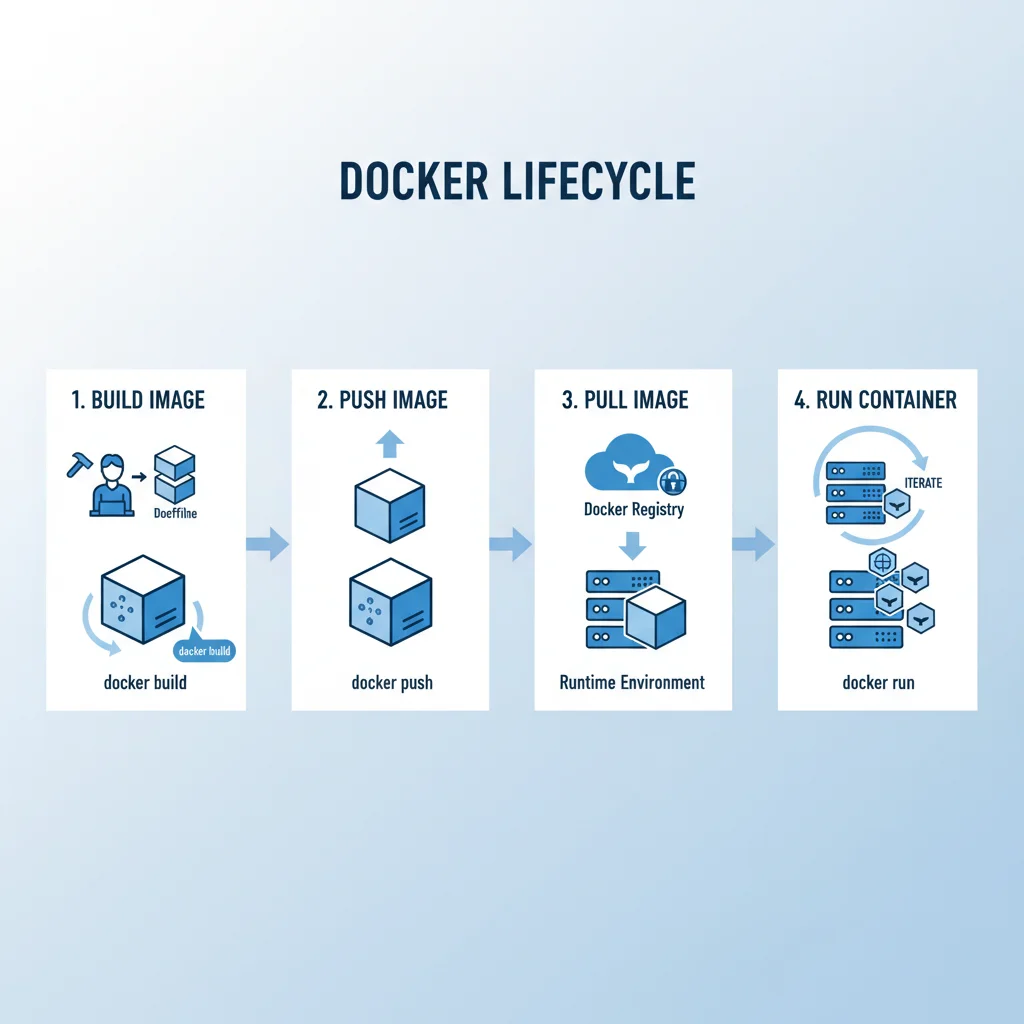
Docker revolutionized software development by providing a simple yet powerful way to package applications and their dependencies into standardized units called containers. Its impact on the industry cannot be overstated, making it an essential component of any modern deployment strategy.
Dockerfile Best Practices for Robust Images
A well-crafted Dockerfile is the first step towards secure and efficient containers. Here are key practices:
- Use Official Base Images: Start with official images from trusted sources (e.g.,
ubuntu,alpine,node) to ensure security and stability. - Minimize Image Size: Smaller images are faster to build, push, pull, and run. Use multi-stage builds, choose alpine-based images, and clean up unnecessary files.
- Layer Caching Optimization: Arrange Dockerfile instructions from least to most frequently changing. This leverages Docker’s layer caching, speeding up builds. For example, add dependencies and run package installs before adding application code.
- Avoid Root User: Run containers as a non-root user whenever possible to mitigate potential security vulnerabilities.
- Specify Exact Versions: Pin base image versions (e.g.,
node:16-alpineinstead ofnode:latest) to ensure reproducibility and prevent unexpected breaking changes. - Use
.dockerignore: Exclude unnecessary files and directories (e.g.,.git,node_modules) from the build context to reduce image size and build time. - Separate Concerns: Each container should ideally run a single process or concern. This promotes modularity and easier scaling.
- Health Checks: Implement health checks (
HEALTHCHECKinstruction) to allow orchestrators like Kubernetes to determine if a container is still running and healthy.
Adhering to these Dockerfile guidelines forms the bedrock of effective Containerization Best Practices, laying the groundwork for secure and performant applications.
Docker Image Security and Management
Beyond the Dockerfile, managing Docker images effectively is crucial:
- Image Scanning: Integrate image vulnerability scanning tools (e.g., Trivy, Clair, Docker Scout) into your CI/CD pipeline to identify and remediate security flaws before deployment.
- Private Registries: Store your proprietary images in private Docker registries (e.g., Docker Hub Private Repositories, AWS ECR, Google Container Registry, Azure Container Registry) to control access and ensure compliance.
- Image Tagging Strategy: Implement a clear tagging strategy (e.g.,
<app>:<version>,<app>:<version>-<commit-sha>,<app>:latest) to manage different versions and environments effectively. - Regular Updates: Keep your base images and application dependencies updated to patch security vulnerabilities and leverage new features.
These practices collectively contribute to a robust and secure Docker ecosystem, a vital element of modern Containerization Best Practices.
Kubernetes: Orchestrating Containers at Scale
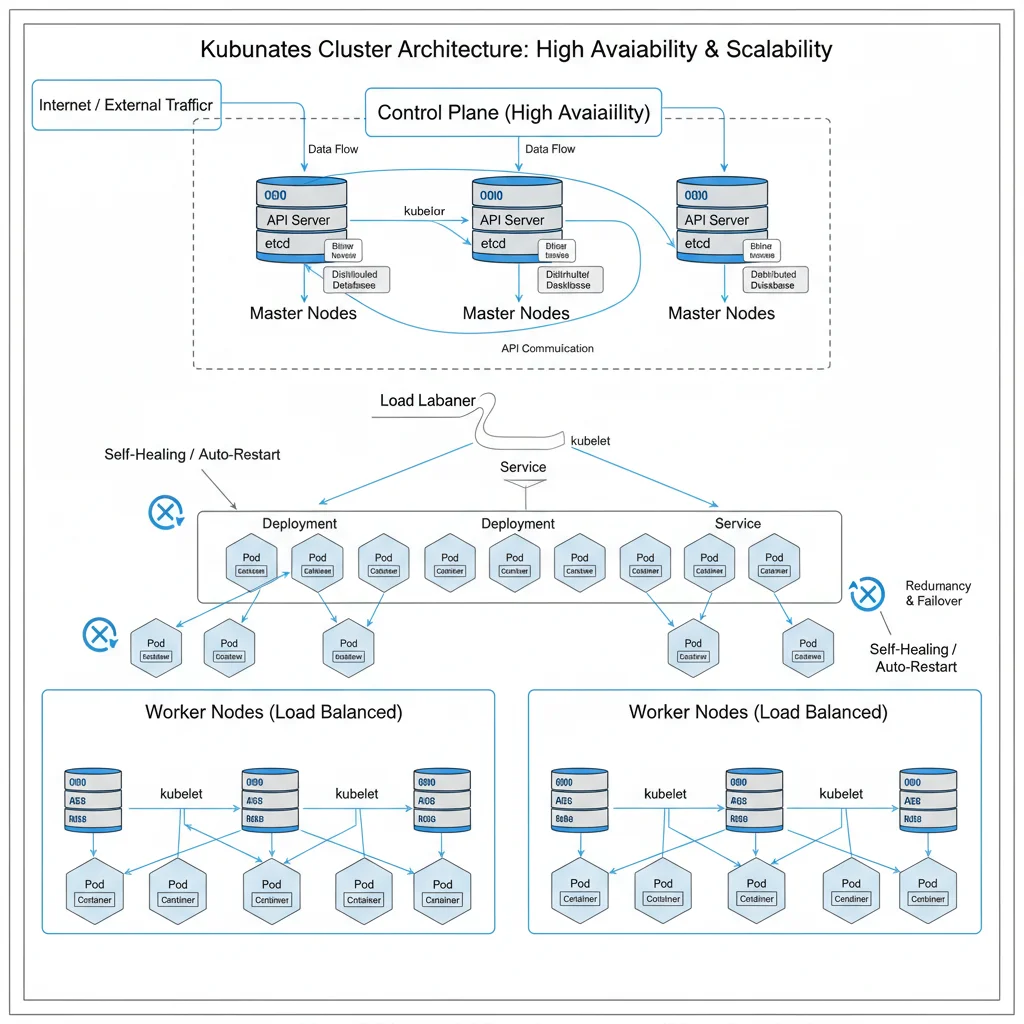
While Docker excels at packaging individual applications, Kubernetes takes containerization to the next level by providing an open-source platform for automating deployment, scaling, and management of containerized applications. It’s the de facto standard for container orchestration.
Kubernetes Deployment Strategies
Effective Kubernetes deployments are critical for maintaining application availability and performance:
- Declarative Configuration: Define your desired state using YAML manifests for all Kubernetes resources (Deployments, Services, Ingress, etc.). This ensures reproducibility and version control.
- Rolling Updates: Utilize Kubernetes’ built-in rolling update strategy for deployments to update applications without downtime. This gradually replaces old pods with new ones.
- Canary Deployments: For critical applications, implement canary deployments where a small percentage of user traffic is routed to the new version, allowing for real-world testing before a full rollout.
- Blue/Green Deployments: Deploy a completely new version of your application alongside the old one. Once thoroughly tested, switch traffic to the new version. This offers zero-downtime rollbacks.
- Immutable Infrastructure: Once a container image is built, it should not be modified. Any changes require building a new image and deploying a new container.
- Resource Requests and Limits: Define CPU and memory requests and limits for your pods. This helps the Kubernetes scheduler optimize resource allocation and prevents resource starvation or noisy neighbor issues.
Mastering these deployment strategies is a cornerstone of advanced Containerization Best Practices, ensuring seamless application updates and high availability.
Security Best Practices in Kubernetes
Securing your Kubernetes cluster and its workloads is paramount:
- Role-Based Access Control (RBAC): Implement strict RBAC policies to define who can do what within your cluster. Grant the principle of least privilege.
- Network Policies: Use Kubernetes Network Policies to control traffic flow between pods and namespaces, isolating applications and preventing unauthorized communication.
- Pod Security Standards (PSS): Apply PSS to enforce security configurations on pods, preventing the deployment of insecure workloads.
- Secrets Management: Use Kubernetes Secrets for sensitive information (API keys, passwords), but consider external secret management solutions (e.g., HashiCorp Vault, cloud provider secret managers) for enhanced security and auditing.
- Image Security: As mentioned with Docker, scan images for vulnerabilities and ensure they come from trusted registries.
- Cluster Hardening: Regularly update Kubernetes versions, restrict API server access, and ensure etcd is securely configured and backed up.
- Logging and Monitoring: Implement comprehensive logging and monitoring solutions (e.g., Prometheus, Grafana, ELK Stack) to detect and respond to security incidents and performance issues.
These security measures are indispensable for any organization implementing Containerization Best Practices in a production environment.
Scalability and High Availability with Kubernetes
Kubernetes is designed for scale and resilience. Here’s how to maximize these capabilities:
- Horizontal Pod Autoscaler (HPA): Configure HPA to automatically scale the number of pods in a deployment or replica set based on observed CPU utilization or other custom metrics.
- Cluster Autoscaler: Integrate a cluster autoscaler to automatically adjust the number of nodes in your cluster based on pending pods and resource utilization.
- Pod Disruption Budgets (PDBs): Define PDBs to ensure a minimum number of healthy pods are running during voluntary disruptions (e.g., node maintenance), enhancing application availability.
- Node Affinity/Anti-Affinity: Use node affinity to schedule pods on specific nodes (e.g., nodes with GPUs) and anti-affinity to ensure pods of the same application are spread across different nodes for high availability.
- Taints and Tolerations: Taints prevent pods from being scheduled on certain nodes, and tolerations allow pods to be scheduled on tainted nodes, useful for dedicated nodes or specific workloads.
- Service Mesh (e.g., Istio, Linkerd): For complex microservices architectures, a service mesh can provide advanced traffic management, observability, and security features, further enhancing scalability and resilience.
Implementing these advanced features ensures that your Kubernetes deployments are not only scalable but also highly available, a crucial aspect of modern Containerization Best Practices.
Cloud Deployment Best Practices with Docker and Kubernetes
Deploying containerized applications to the cloud requires a strategic approach. Here’s how to integrate Docker and Kubernetes effectively with cloud providers:
Choosing Your Cloud Provider and Managed Kubernetes Service
Most major cloud providers offer managed Kubernetes services, simplifying cluster management:
- AWS EKS (Elastic Kubernetes Service): Integrates well with other AWS services, offering robust security and scalability.
- Google GKE (Google Kubernetes Engine): Known for its advanced features, auto-scaling capabilities, and deep integration with Google Cloud.
- Azure AKS (Azure Kubernetes Service): Provides a cost-effective and easy-to-manage Kubernetes solution with strong Azure ecosystem integration.
- DigitalOcean Kubernetes, Linode Kubernetes Engine, etc.: Excellent options for smaller deployments or those seeking simpler management.
The choice often depends on existing cloud investments, specific feature requirements, and team expertise. Regardless of the provider, adhering to general Containerization Best Practices remains vital.
CI/CD Pipelines for Containerized Applications
Automating your build, test, and deployment processes is fundamental for efficient cloud deployment:
- Automated Builds: Use tools like Jenkins, GitLab CI/CD, GitHub Actions, or AWS CodeBuild to automatically build Docker images upon code commits.
- Image Scanning in CI/CD: Integrate vulnerability scanning as part of your CI/CD pipeline to catch security issues early.
- Automated Testing: Implement unit, integration, and end-to-end tests within your pipeline to ensure application quality.
- Automated Deployments: Configure your CI/CD to automatically deploy new versions to Kubernetes using tools like Argo CD, Flux CD, or Helm.
- GitOps: Embrace GitOps principles where Git repositories are the single source of truth for declarative infrastructure and applications. This enhances traceability and simplifies rollbacks.
A well-oiled CI/CD pipeline is a non-negotiable part of modern Containerization Best Practices, especially for rapid cloud deployments.
Monitoring, Logging, and Tracing in Cloud-Native Environments
Visibility into your containerized applications is crucial for troubleshooting and performance optimization:
- Centralized Logging: Aggregate logs from all your containers and Kubernetes components into a centralized logging system (e.g., ELK Stack, Splunk, Datadog, cloud-native logging services).
- Metrics Collection: Use Prometheus and Grafana (or cloud-specific monitoring tools) to collect and visualize metrics from your cluster, nodes, and applications.
- Distributed Tracing: Implement distributed tracing (e.g., Jaeger, Zipkin) for microservices architectures to track requests across multiple services and identify performance bottlenecks.
- Alerting: Set up alerts based on critical metrics and log patterns to proactively identify and respond to issues.
Comprehensive observability is a critical aspect of effective Containerization Best Practices, enabling quick problem resolution and informed decision-making.
Advanced Containerization Concepts for 2026
As the container landscape matures, several advanced concepts are gaining prominence, further enhancing the capabilities of Docker and Kubernetes.
Serverless Containers (Fargate, Google Cloud Run, Azure Container Apps)
Serverless container platforms allow you to run containers without managing the underlying infrastructure. This abstracts away node management, patching, and scaling, letting you focus purely on your application code. Services like AWS Fargate, Google Cloud Run, and Azure Container Apps are prime examples, offering a compelling blend of containerization and serverless benefits. They align perfectly with the goal of reducing operational overhead, a key driver for evolving Containerization Best Practices.
WebAssembly (Wasm) and Containerization
WebAssembly (Wasm) is emerging as a potential game-changer for server-side applications, offering extremely lightweight, fast, and secure execution environments. While still nascent in the server-side context, Wasm modules could eventually run alongside or even within containers, providing even greater efficiency and security isolation. Keeping an eye on Wasm’s integration with container runtimes is a forward-looking aspect of Containerization Best Practices.
Edge Computing and Containerization
As more data processing moves closer to the source (edge computing), containers are playing a vital role. Docker and Kubernetes can deploy and manage applications on edge devices, enabling low-latency processing and reducing reliance on centralized cloud infrastructure. This extends the reach and utility of Containerization Best Practices to new frontiers.
AI/ML Workloads in Containers
The ability to package complex AI/ML models and their dependencies into containers has streamlined their deployment. Kubernetes provides excellent orchestration for training and inference workloads, allowing for efficient resource allocation, GPU scheduling, and version control of models. This specialized application of Containerization Best Practices is growing rapidly.
Challenges and Considerations for 2026
While the benefits are clear, adopting Containerization Best Practices also comes with challenges:
- Complexity: Kubernetes, in particular, has a steep learning curve. Organizations need to invest in training and expertise.
- Cost Management: Without proper monitoring and resource allocation, cloud costs for containerized environments can escalate.
- Data Persistence: Managing persistent storage for stateful applications in ephemeral container environments requires careful planning. Solutions like StatefulSets and persistent volumes are key.
- Security Landscape: The dynamic nature of containers introduces new security considerations, requiring continuous vigilance and updated strategies.
- Vendor Lock-in: While containers aim for portability, deep integration with specific cloud services can lead to a degree of vendor lock-in.
Addressing these challenges proactively is crucial for successful and sustainable container adoption.
Conclusion: Embracing the Future with Containerization Best Practices
The journey towards fully optimized cloud deployment in 2026 is paved with well-implemented Containerization Best Practices. Docker and Kubernetes, working in tandem, offer an unparalleled platform for building, deploying, and managing applications with efficiency, scalability, and security. From crafting lean Docker images to orchestrating complex microservices with Kubernetes, every step in this process contributes to a resilient and high-performing infrastructure.
Organizations that invest in understanding and applying these principles will not only gain a significant competitive advantage but also build systems that are adaptable to future technological shifts. The future of cloud computing is containerized, and by embracing these best practices, you are positioning your enterprise at the cutting edge of innovation.
Stay informed, continuously refine your strategies, and leverage the power of the container ecosystem to drive your digital ambitions forward. The landscape of 2026 demands nothing less than excellence in containerization.