Python Coding: Novice to Pro in 6 Weeks – Your Ultimate Guide

In today’s rapidly evolving digital landscape, the ability to code is no longer just a specialized skill for tech professionals; it’s a superpower that opens doors to countless opportunities. From data science and artificial intelligence to web development and automation, Python stands out as one of the most versatile and beginner-friendly programming languages. If you’ve ever dreamt of diving into the world of programming but felt overwhelmed by where to start, this comprehensive 6-week plan to learn Python coding is your ultimate roadmap.
Many aspiring coders are intimidated by the sheer volume of information available, often leading to analysis paralysis or giving up too soon. This guide is designed to cut through the noise, providing a clear, structured, and actionable path for anyone to transform from a complete novice to a confident Python programmer in just a month and a half. We’ll break down complex concepts into digestible weekly modules, ensuring a steady and rewarding learning curve. By the end of this journey, you won’t just understand Python; you’ll be able to build practical applications and solve real-world problems.
Whether your goal is to automate tedious tasks, analyze data, develop web applications, or simply expand your intellectual horizons, mastering Python is an invaluable asset. This plan emphasizes hands-on practice, which is crucial for solidifying theoretical knowledge. We’ll guide you through setting up your development environment, understanding core programming principles, and tackling increasingly complex projects. Get ready to embark on an exciting and transformative adventure to learn Python coding!
The Power of Python: Why Choose This Language?
Before we delve into the weekly breakdown, it’s worth understanding why Python has become such a dominant force in the programming world. Its popularity isn’t accidental; it’s a result of several key advantages that make it an ideal choice for both beginners and experienced developers.
Simplicity and Readability
One of Python’s most celebrated features is its elegant syntax, which closely resembles natural language. This makes it incredibly easy to read and write, significantly reducing the learning curve for newcomers. Unlike other languages that require strict adherence to curly braces and semicolons, Python uses indentation to define code blocks, promoting clean and organized code. This focus on readability means you can spend less time deciphering cryptic syntax and more time understanding programming logic, making it perfect to learn Python coding.
Versatility and Wide Applications
Python is a true general-purpose language. Its applications span across numerous domains:
- Web Development: Frameworks like Django and Flask enable rapid development of robust web applications.
- Data Science & Machine Learning: Libraries such as NumPy, Pandas, Scikit-learn, and TensorFlow have made Python the de facto language for data analysis, machine learning, and artificial intelligence.
- Automation & Scripting: Python’s ease of use makes it perfect for automating repetitive tasks, system administration, and creating utility scripts.
- Desktop Applications: While not its primary strength, libraries like PyQt and Kivy allow for the creation of desktop GUI applications.
- Game Development: Pygame library allows for 2D game creation.
- Education: Its simplicity makes it an excellent first language for teaching programming concepts.
This incredible versatility means that once you learn Python coding, you’ll have a skill set applicable to a vast array of career paths and personal projects.
Large and Supportive Community
Python boasts one of the largest and most active programming communities globally. This translates into an abundance of resources: extensive documentation, countless tutorials, forums (like Stack Overflow), and open-source projects. Whenever you encounter a problem, chances are someone else has faced it before, and a solution is readily available. This strong community support is invaluable for beginners as they navigate the challenges of learning a new skill.
Rich Ecosystem of Libraries and Frameworks
The Python Package Index (PyPI) hosts over 400,000 projects, offering pre-built modules and libraries for almost any task imaginable. This vast ecosystem means you rarely have to start from scratch. Need to work with dates and times? There’s a library for that. Need to send an email? There’s a library for that. This ‘batteries-included’ philosophy significantly speeds up development and allows you to focus on the unique aspects of your project, further solidifying its position as a top language to learn Python coding.
Your 6-Week Plan to Learn Python Coding: A Detailed Roadmap
This structured plan is designed to build your knowledge incrementally, ensuring a solid foundation before moving to more advanced topics. Consistency is key, so aim for at least 1-2 hours of dedicated practice daily.
Week 1: The Absolute Basics & Setup
Your journey to learn Python coding begins here. This week is all about getting comfortable with your environment and understanding the very first principles of programming.
Day 1-2: Setting Up Your Environment
- Install Python: Download the latest stable version from python.org.
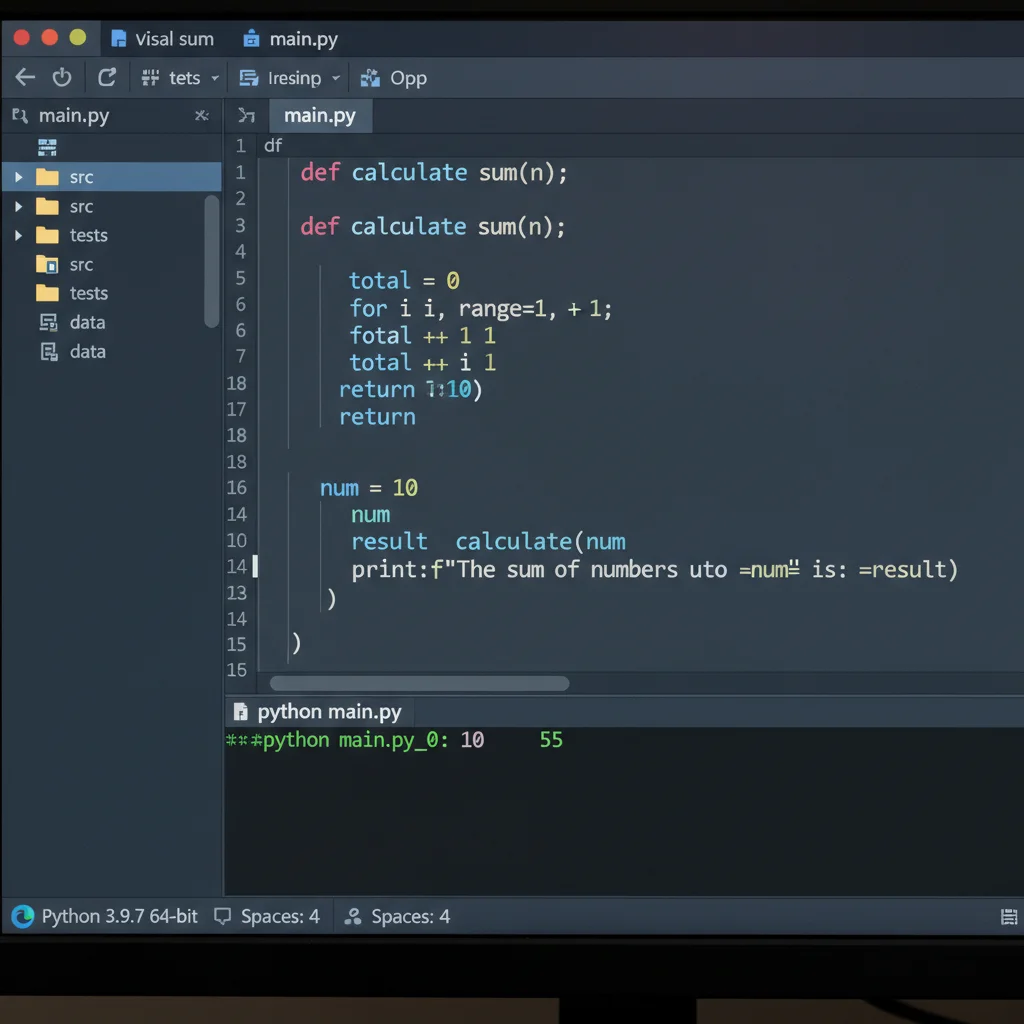
- Choose an IDE/Text Editor: Install Visual Studio Code (VS Code) – it’s free, powerful, and widely used. Learn how to open files and run simple Python scripts.
- Hello World: Write and execute your first Python program:
print("Hello, World!"). Understand whatprint()does. - Comments: Learn to use
#for single-line comments and triple quotes for multi-line comments.
Day 3-4: Variables and Basic Data Types
- Variables: Understand what variables are, how to declare them, and assign values (e.g.,
name = "Alice",age = 30). - Data Types: Explore fundamental data types: integers (
int), floating-point numbers (float), strings (str), and booleans (bool). - Type Conversion: Learn how to convert between types (e.g.,
int(),str(),float()). - Basic Input/Output: Use
input()to get user input andprint()to display output.
Day 5-7: Operators and Simple Expressions
- Arithmetic Operators: Practice with addition, subtraction, multiplication, division, modulus, exponentiation, and floor division.
- Comparison Operators: Understand
==,!=,<,>,<=,>=and how they return boolean values. - Logical Operators: Learn
and,or,notfor combining conditions. - Assignment Operators: Explore shorthand like
+=,-=, etc. - Mini-Project: Create a simple calculator that takes two numbers and an operator from the user and performs the calculation.
Week 2: Control Flow & Data Structures – Part 1
Now that you have the very basic building blocks, this week focuses on making your programs dynamic and capable of handling collections of data. This is crucial for anyone who wants to truly learn Python coding effectively.
Day 8-9: Conditional Statements (if/else)
ifStatement: Execute code blocks based on a condition.if-elseStatement: Provide alternative execution paths.if-elif-elseChain: Handle multiple conditions.- Nested Conditionals: Understand how to use
ifstatements within otherifstatements. - Practice: Write a program that checks if a number is positive, negative, or zero; or determines if a user is old enough to vote.
Day 10-11: Loops (for & while)
forLoop: Iterate over sequences (covered later this week) or a range of numbers usingrange().whileLoop: Repeat code as long as a condition is true.breakandcontinue: Learn how to control loop execution.- Practice: Print numbers from 1 to 10, calculate the sum of numbers in a range, or create a simple guessing game.
Day 12-14: Lists & Tuples
- Lists: Introduction to ordered, mutable collections. Learn to create, access elements, modify, add, and remove items.
- List Methods: Explore
append(),insert(),remove(),pop(),sort(),len(). - List Slicing: Extract sub-lists.
- Tuples: Understand ordered, immutable collections. When to use tuples vs. lists.
- Mini-Project: Create a shopping list program where users can add, remove, and view items.
Week 3: Data Structures – Part 2 & Functions
This week expands your data handling capabilities with more advanced structures and introduces the fundamental concept of functions, which are critical for organizing and reusing your code. This is where your journey to learn Python coding starts to get really powerful.
Day 15-16: Dictionaries
- Dictionaries: Introduction to unordered, mutable collections of key-value pairs. Learn to create, access, add, modify, and delete entries.
- Dictionary Methods: Explore
keys(),values(),items(),get(). - Iterating through Dictionaries: How to loop through keys, values, or both.
- Practice: Create a simple contact book or a dictionary to store product information.
Day 17-18: Sets
- Sets: Understand unordered collections of unique elements. Learn to create, add, remove elements.
- Set Operations: Practice union, intersection, difference, and symmetric difference.
- Use Cases: When to use sets for membership testing or removing duplicates.
Day 19-21: Functions
- Defining Functions: Learn how to create your own reusable blocks of code using
def. - Parameters and Arguments: Pass data into functions.
- Return Values: Send results back from functions.
- Scope of Variables: Understand local and global variables.
- Default Arguments & Keyword Arguments: Make functions more flexible.
- Mini-Project: Refactor your previous calculator or shopping list program into functions. Create a function to check if a number is prime.
Week 4: Modules, Error Handling & File I/O
By now, you should be comfortable with basic programming constructs. This week focuses on making your programs more robust, organized, and capable of interacting with external data, a crucial step when you learn Python coding for real-world applications.
Day 22-23: Modules and Packages
- What are Modules: Understand how to organize code into separate files.
- Importing Modules: Learn
import,from import, and aliasing. - Standard Library Modules: Explore common modules like
math,random,datetime. - Creating Your Own Modules: Practice making a simple module and importing it.
Day 24-25: Error Handling (Try-Except)
- Types of Errors: Differentiate between syntax errors and runtime errors (exceptions).
try-exceptBlock: Learn how to gracefully handle errors to prevent program crashes.- Catching Specific Exceptions: Handle different error types (e.g.,
ValueError,TypeError,FileNotFoundError). elseandfinallyBlocks: Understand their usage in error handling.
Day 26-28: File Input/Output (I/O)
- Opening and Closing Files: Use
open()andclose(), and the preferredwith open() as file:syntax. - Reading Files: Learn
read(),readline(),readlines(). - Writing to Files: Use
write()andwritelines(). - Working with CSV Files: Basic introduction to reading and writing CSV data (perhaps using the
csvmodule). - Mini-Project: Create a simple to-do list application that saves and loads tasks from a text file.
Week 5: Object-Oriented Programming (OOP) Fundamentals
OOP is a paradigm that structures programs using objects and classes. It’s a cornerstone of modern software development and essential for building larger, more maintainable applications. Mastering this will elevate your ability to learn Python coding to a professional level.
Day 29-30: Classes and Objects
- Introduction to OOP: Understand its principles (encapsulation, inheritance, polymorphism – briefly).
- Defining Classes: Use the
classkeyword. - Creating Objects (Instances): Instantiate objects from classes.
- Attributes: Define data associated with an object.
- Methods: Define functions that belong to an object.
__init__Method (Constructor): Initialize object attributes.
Day 31-32: Inheritance
- Concept of Inheritance: Create new classes (child/derived) from existing classes (parent/base).
- Overriding Methods: Modify parent class methods in child classes.
super()Function: Call methods from the parent class.
Day 33-35: Polymorphism & Encapsulation
- Polymorphism: Understand how objects of different classes can be treated as objects of a common type.
- Encapsulation: Concept of bundling data and methods that operate on the data within a single unit (class).
- Access Modifiers (Convention): Understanding public, protected (
_), and private (__) attributes/methods in Python. - Mini-Project: Design a simple class hierarchy, e.g., a
Vehicleclass with subclasses likeCarandMotorcycle, each with their own attributes and methods.
Week 6: Advanced Topics & Project Development
This final week consolidates your knowledge, introduces some powerful advanced features, and culminates in a more substantial project. This is where you truly start to feel like you can learn Python coding and apply it effectively.
Day 36-37: List Comprehensions & Lambda Functions
- List Comprehensions: A concise way to create lists.
- Dictionary Comprehensions: Similar concise way for dictionaries.
- Lambda Functions (Anonymous Functions): Small, single-expression functions.
map(),filter(),reduce(): Functional programming concepts with lambda.
Day 38-39: Iterators & Generators
- Iterators: Understand objects that can be iterated over (e.g., lists, tuples).
__iter__and__next__: How iteration works behind the scenes.- Generators: Functions that yield values one by one, saving memory.
yieldKeyword: The core of generator functions.
Day 40-42: Introduction to a Framework/Library & Final Project
- Choose a Focus: Depending on your interest, spend a day or two exploring a popular library or framework:
- Web Development: Flask (micro-framework for web apps)
- Data Analysis: Pandas (for data manipulation)
- GUI Development: Tkinter (built-in GUI library)
- Final Project: This is the culmination of your 6-week effort. Pick one of the following (or something similar) and try to build it from scratch, applying all the concepts you’ve learned:
- Text-Based Adventure Game: Use functions, conditionals, loops, and potentially file I/O for saving progress.
- Simple Contact Manager: Store contacts in a dictionary, allow adding, viewing, searching, and deleting. Save data to a file.
- Basic Web Scraper: Use the
requestsandBeautifulSouplibraries (you’ll need to install them) to extract data from a simple website (e.g., product names and prices from a static page). - Command-Line Quiz Application: Load questions from a file, keep score, and provide feedback.
Tips for Success in Your Python Coding Journey
Simply following the plan isn’t enough; your mindset and approach to learning will significantly impact your success in your quest to learn Python coding.
1. Practice Consistently and Daily
Coding is a skill, and like any skill, it improves with consistent practice. Aim for at least 1-2 hours every day. Short, focused sessions are more effective than long, infrequent ones. Repetition helps solidify concepts and builds muscle memory for coding.
2. Don’t Just Read, Code!
It’s easy to fall into the trap of watching tutorials or reading documentation without actively coding. The only way to truly understand a concept is to implement it yourself. Type out the examples, experiment with variations, and try to break the code to understand its limits.
3. Understand, Don’t Memorize
Programming is about problem-solving and understanding logical flows, not memorizing syntax. Focus on grasping the ‘why’ behind each concept. If you understand the underlying principles, you can always look up the exact syntax when needed.
4. Break Down Problems
Large problems can be daunting. Learn to break them down into smaller, manageable sub-problems. Solve each small piece individually, and then combine them to solve the larger problem. This is a fundamental skill for any programmer.
5. Use Debugging Tools
Errors are an inevitable part of coding. Learn to use your IDE’s debugger (like the one in VS Code) to step through your code line by line, inspect variable values, and understand where things go wrong. This is an invaluable skill for efficient problem-solving.
6. Don’t Be Afraid to Ask for Help
The Python community is vast and welcoming. If you’re stuck, don’t hesitate to search online (Stack Overflow is your best friend!) or ask questions in forums or online communities. Learning to articulate your problem is also a skill in itself.
7. Build Projects, Even Small Ones
Theory is good, but applying it to build something tangible is where real learning happens. Even simple projects like a calculator, a to-do list, or a guessing game will reinforce your knowledge and give you a sense of accomplishment. The mini-projects in this plan are designed for this purpose.
8. Review and Refactor Your Code
Periodically revisit your old code. Can you make it more efficient? More readable? Can you apply new concepts you’ve learned? Refactoring is a crucial practice for improving your coding style and understanding.
9. Stay Curious and Keep Learning
The world of programming is constantly evolving. Once you’ve completed this 6-week plan, don’t stop! Explore new libraries, delve deeper into specific areas (like data science or web development), and keep challenging yourself with new problems. The journey to learn Python coding is continuous.
Beyond 6 Weeks: What’s Next After You Learn Python Coding?
Congratulations! If you’ve diligently followed this 6-week plan, you’ve achieved a significant milestone and have a solid foundation in Python programming. But learning doesn’t stop here; it merely transitions to a new phase. Here are some directions you might consider:
Specialize in a Domain
Python’s versatility means you can choose a path that genuinely interests you:
- Data Science & Machine Learning: Dive deeper into libraries like Pandas, NumPy, Matplotlib, Seaborn, Scikit-learn, TensorFlow, and PyTorch. Explore concepts like statistical analysis, data visualization, predictive modeling, and neural networks.
- Web Development: Master a framework like Django or Flask. Learn about databases (SQL, NoSQL), front-end technologies (HTML, CSS, JavaScript), and API development.
- Automation & Scripting: Explore advanced scripting techniques, system administration tasks, and interacting with APIs of other services.
- Game Development: Continue with Pygame or explore other game engines that support Python.
Contribute to Open Source
Contributing to open-source projects is an excellent way to gain real-world experience, learn from experienced developers, and build a portfolio. Start with small bug fixes or documentation improvements.
Build More Complex Projects
Challenge yourself with larger, multi-faceted projects. Think about problems you encounter in your daily life and how Python could offer a solution. Building a portfolio of projects is vital for demonstrating your skills to potential employers.
Learn Advanced Python Concepts
There’s always more to learn: decorators, context managers, metaclasses, asynchronous programming, and more. These advanced topics will further refine your understanding and allow you to write more efficient and Pythonic code.
Explore Other Programming Languages
While Python is a fantastic language, learning another language like JavaScript (for front-end web development), Java (for enterprise applications), or C++ (for performance-critical systems) can broaden your perspective and make you a more versatile developer.
Conclusion
The journey to learn Python coding from novice to a capable programmer in just 6 weeks is ambitious but entirely achievable with dedication and the right plan. This guide has provided you with a structured roadmap, breaking down complex topics into manageable weekly goals. Remember, consistency, hands-on practice, and a problem-solving mindset are your most powerful tools.
You’ve started with ‘Hello, World!’ and by the end, you’ll be building your own functional applications. Embrace the challenges, celebrate the small victories, and never stop being curious. The world of coding is vast and exciting, and with Python as your foundation, you’re well-equipped to explore its endless possibilities. Happy coding!