Virtual Meeting Software Comparison 2026: Zoom, Teams, Google Meet for Large Webinars
In the rapidly evolving landscape of digital communication, virtual meetings have become an indispensable part of business operations, education, and social interaction. As we look towards 2026, the demand for robust, scalable, and feature-rich virtual meeting software, especially for large-scale webinars, continues to grow. Organizations worldwide are constantly seeking the optimal platform that can not only accommodate hundreds or thousands of participants but also provide an engaging, secure, and seamless experience. This comprehensive guide offers a detailed virtual meeting comparison of the three industry giants: Zoom, Microsoft Teams, and Google Meet, specifically evaluating their prowess in handling large-scale webinars.
Choosing the right platform is not merely about brand recognition; it’s about aligning a software’s capabilities with your specific needs. For large webinars, factors such as participant capacity, interactive features, reliability, security, integration capabilities, and cost are paramount. Each of these platforms brings its unique strengths and weaknesses to the table, and understanding these nuances is crucial for making an informed decision that will serve your organization effectively in 2026 and beyond.
The Evolving Landscape of Virtual Meetings in 2026
The year 2026 marks a significant point in the evolution of virtual communication. The initial surge in remote work and online events has matured, leading to more sophisticated demands from users. Today, a virtual meeting is not just about seeing and hearing others; it’s about fostering collaboration, ensuring accessibility, and delivering a high-quality experience that rivals or even surpasses in-person events. For large-scale webinars, this means supporting interactive elements, providing robust analytics, and maintaining stable connections for a vast number of attendees simultaneously.
Organizations are increasingly prioritizing platforms that offer advanced customization options, seamless integration with existing enterprise tools, and enhanced security protocols to protect sensitive information and prevent disruptions. The competition among Zoom, Microsoft Teams, and Google Meet has driven innovation, pushing each platform to develop more advanced features tailored for diverse use cases, including educational seminars, corporate training, product launches, and global conferences. Our virtual meeting comparison will delve into how each platform addresses these evolving requirements.
Zoom: The Webinar Powerhouse
Overview and Core Strengths
Zoom has long been synonymous with virtual meetings, establishing itself as a leader particularly in the webinar space. Its intuitive interface and reliable performance have made it a go-to choice for many organizations. Zoom’s dedicated webinar product, Zoom Webinars, is specifically designed to host large audiences, offering a distinct presenter/attendee dynamic that is ideal for broadcast-style events.
Key Features for Large-Scale Webinars (2026 Perspective)
- Participant Capacity: Zoom Webinars can host up to 50,000 attendees, with higher capacities available through enterprise plans. This makes it a formidable contender for even the largest global events.
- Interactive Tools: It offers a rich suite of interactive features including Q&A, live polling, hand raising, and chat functions. These tools are crucial for keeping large audiences engaged and collecting valuable feedback.
- Panelist and Attendee Roles: Zoom clearly differentiates between panelists (who can speak, share video, and screen share) and attendees (who primarily view the content), which helps in managing large events efficiently.
- Branding and Customization: Organizations can customize the webinar registration page, post-webinar landing page, and in-webinar experience with their branding, offering a professional touch.
- Reporting and Analytics: Comprehensive post-webinar reports provide insights into attendee engagement, Q&A activity, and polling results, which are invaluable for measuring event success and future planning.
- Integration Ecosystem: Zoom integrates with a wide array of CRM, marketing automation, and event management platforms, streamlining workflows for event organizers.
- Breakout Rooms: While primarily a webinar platform, Zoom also offers breakout rooms in its standard meeting product, which can be leveraged for smaller, interactive sessions following a main webinar, though this requires careful planning.
Performance and Reliability
Zoom has invested heavily in its infrastructure to ensure high-quality video and audio even with thousands of participants. Its cloud-based architecture is designed for scalability and minimal latency, which is critical for large, global audiences. The platform generally boasts high uptime and robust performance, making it a reliable choice for mission-critical events.
Security Enhancements
Following initial security concerns, Zoom has significantly enhanced its security features. In 2026, it offers end-to-end encryption for meetings, advanced waiting room controls, password protection, and robust authentication methods, ensuring that large webinars are secure from unauthorized access and disruptions.
Pricing Structure
Zoom’s pricing for webinars is typically tiered based on participant capacity, offering various plans to suit different organizational needs. While it can be a significant investment for very large capacities, the feature set and reliability often justify the cost for professional webinar hosts.
Microsoft Teams: The Integrated Enterprise Solution
Overview and Core Strengths
Microsoft Teams, as part of the broader Microsoft 365 ecosystem, is an integrated communication and collaboration platform. While initially focused on internal team collaboration, Teams has evolved significantly to support external meetings and large-scale events, leveraging its deep integration with other Microsoft products.
Key Features for Large-Scale Webinars (2026 Perspective)
- Participant Capacity: Microsoft Teams Live Events supports up to 10,000 attendees, and with the Advanced Communications add-on, it can be extended to 20,000 or even 100,000 for specific scenarios with Microsoft’s assistance. This makes it a strong contender for very large events within an enterprise context.
- Integration with Microsoft 365: Its seamless integration with Outlook, SharePoint, OneDrive, and other Microsoft services is a major advantage for organizations already invested in the Microsoft ecosystem. This simplifies scheduling, content sharing, and post-event follow-up.
- Interactive Elements: Teams Live Events offers Q&A, polls (via Microsoft Forms), and chat functionality. While not as extensive as Zoom’s dedicated webinar tools, they provide sufficient engagement for many large events.
- Presenter Controls: Presenters have granular control over who can speak, share content, and manage the flow of the event, which is essential for maintaining order in large webinars.
- Event Production: Teams Live Events allows for professional production capabilities, including the ability to stream from external encoders (e.g., OBS Studio) for higher production value, and the use of a dedicated producer role to manage the event backend.
- Transcription and Captioning: Automated live captions and transcription services enhance accessibility and provide valuable post-event resources.
- Security and Compliance: Leveraging Microsoft’s robust enterprise-grade security and compliance frameworks, Teams Live Events offers advanced data protection, access controls, and adherence to various industry regulations.

Performance and Reliability
Microsoft’s global data center infrastructure provides a highly reliable and scalable backbone for Teams. Performance for Live Events is generally strong, particularly for organizations within the Microsoft 365 environment. The platform is designed to handle large simultaneous streams effectively.
Security Enhancements
Security is a cornerstone of Microsoft’s offerings. Teams Live Events benefits from Microsoft’s extensive security measures, including multifactor authentication, data encryption in transit and at rest, and compliance with numerous global standards, making it a secure choice for sensitive corporate webinars.
Pricing Structure
Microsoft Teams Live Events is typically included with certain Microsoft 365 enterprise licenses (e.g., E3, E5). For higher capacities or advanced features, specific add-ons like Advanced Communications might be required, which adds to the overall subscription cost.
Google Meet: The Accessible and Scalable Option
Overview and Core Strengths
Google Meet, a core component of Google Workspace, is known for its ease of use, accessibility, and integration with Google’s suite of productivity tools. While perhaps not as feature-rich as Zoom Webinars for dedicated event hosting, it has made significant strides in supporting larger audiences and offering a straightforward user experience.
Key Features for Large-Scale Webinars (2026 Perspective)
- Participant Capacity: Google Meet supports up to 500 participants in a standard meeting, but with specific Google Workspace editions (e.g., Enterprise Plus), it can host up to 1,000 active participants. Furthermore, Live Streaming capabilities allow up to 100,000 viewers for certain editions, making it suitable for large broadcasts where interaction is less critical.
- Ease of Use: Google Meet is renowned for its simplicity. Joining a meeting or live stream is typically a one-click process, which is highly beneficial for ensuring broad audience participation, especially for those less tech-savvy.
- Integration with Google Workspace: Deep integration with Google Calendar, Gmail, Google Docs, and other Workspace applications simplifies scheduling, sharing documents, and collaborative work before, during, and after the event.
- Interactive Features: For standard meetings, Meet offers Q&A, polls, and hand raising. For live streams, interaction is generally limited to chat or external channels, depending on the setup.
- Live Captions and Translation: Google Meet provides highly accurate live captions, which are crucial for accessibility. Real-time translation of captions is also a growing feature, enhancing global reach.
- Recording: Meetings and live streams can be easily recorded and saved directly to Google Drive, simplifying content management and sharing for on-demand viewing.
- Security: Google’s robust security infrastructure protects Meet sessions, with features like anti-abuse measures, encryption in transit and at rest, and compliance with various privacy standards.
Performance and Reliability
Leveraging Google’s vast global network and data centers, Google Meet offers excellent reliability and performance. Its infrastructure is designed to handle high volumes of traffic, ensuring stable connections for large audiences, especially for live-streamed events.
Security Enhancements
Google continuously updates its security protocols. For Meet, this includes strong encryption, proactive anti-abuse measures, and enterprise-grade access controls, making it a secure platform for organizations using Google Workspace.
Pricing Structure
Google Meet’s advanced features and higher participant capacities are typically included with various Google Workspace enterprise plans. The cost is part of the overall Workspace subscription, making it an attractive option for organizations already utilizing Google’s ecosystem.
Virtual Meeting Comparison: Head-to-Head for Large Webinars (2026)
To truly understand which platform excels, let’s conduct a direct virtual meeting comparison across several critical dimensions relevant to large-scale webinars in 2026.
1. Participant Capacity and Scalability
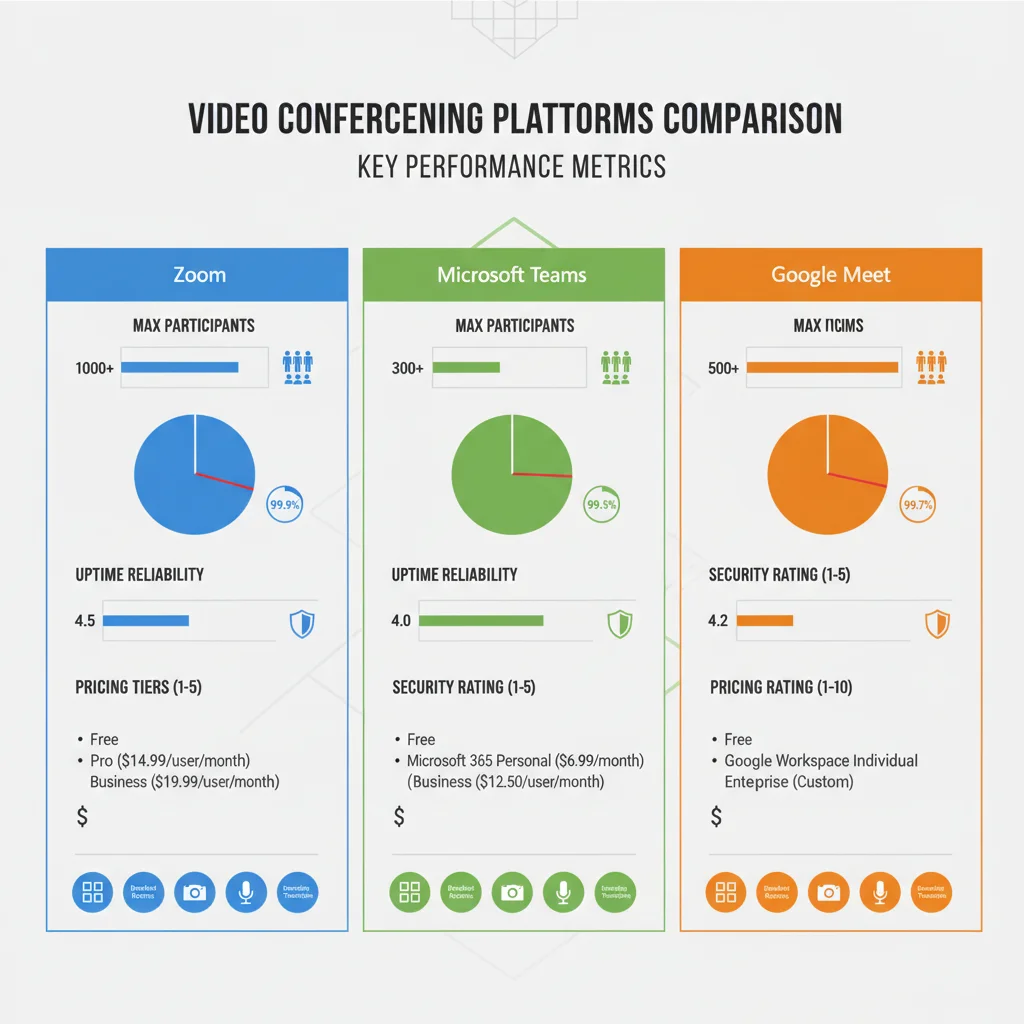
- Zoom: Offers the highest standard capacity for interactive webinars (up to 50,000) with dedicated webinar features. Highly scalable and purpose-built for large events.
- Microsoft Teams: Strong for large internal events (10,000-20,000 with add-ons) and broadcast-style events (up to 100,000 for Live Events). Scalability is excellent within the Microsoft ecosystem.
- Google Meet: Good for large meetings (up to 1,000 active) and very large broadcasts (up to 100,000 live stream viewers). Scalable but interaction features are limited for the largest audiences.
Verdict: For purely interactive, large-scale webinars requiring two-way communication and extensive engagement tools, Zoom generally leads. For broadcast-style events with massive viewership, all three offer competitive solutions, with Teams and Meet providing similar capacities for live streaming.
2. Interactive Features and Engagement
- Zoom: Unrivaled in its dedicated webinar features: advanced Q&A management, detailed polling, robust chat, and virtual hand-raising. Designed to maximize audience engagement in large groups.
- Microsoft Teams: Offers standard Q&A, polling (via Forms), and chat. Sufficient for many corporate webinars but might require external tools for more complex engagement scenarios.
- Google Meet: Basic Q&A and polling for standard meetings. Live streams are more one-way communication, with limited native interactive elements for the audience.
Verdict: Zoom is the clear winner for organizations prioritizing deep audience interaction and a rich set of engagement tools within their large webinars.
3. Ease of Use and User Experience
- Zoom: Generally intuitive for both presenters and attendees, with a streamlined interface for webinar management.
- Microsoft Teams: Can have a steeper learning curve for new users, especially for Live Events production. Integrates well for existing Microsoft 365 users.
- Google Meet: Extremely easy to use and join, making it highly accessible for diverse audiences.
Verdict: For sheer simplicity and ease of access for attendees, Google Meet stands out. Zoom offers a good balance of features and usability, while Teams requires more familiarity with its ecosystem.
4. Integration with Ecosystems
- Zoom: Strong API and marketplace for integrations with CRM, marketing, and event platforms.
- Microsoft Teams: Deepest integration with the Microsoft 365 suite, providing a cohesive experience for enterprises.
- Google Meet: Seamlessly integrated with Google Workspace, ideal for organizations operating within that ecosystem.
Verdict: This depends entirely on your existing technology stack. Microsoft Teams for Microsoft users, Google Meet for Google Workspace users, and Zoom for those seeking broader, platform-agnostic integrations.
5. Security and Compliance
- Zoom: Significantly improved, offering robust encryption and granular security controls.
- Microsoft Teams: Enterprise-grade security and compliance, leveraging Microsoft’s global infrastructure and regulatory adherence.
- Google Meet: Strong security features, encryption, and compliance within the Google ecosystem.
Verdict: All three platforms offer strong security. Microsoft Teams and Google Meet benefit from being part of larger enterprise suites with established compliance frameworks, which can be a deciding factor for highly regulated industries. Zoom has caught up significantly and remains a secure option.
6. Pricing and Value Proposition
- Zoom: Dedicated webinar plans can be costly but offer unparalleled features and capacity.
- Microsoft Teams: Often included or available as an add-on within existing Microsoft 365 subscriptions, offering good value for integrated enterprises.
- Google Meet: Included with Google Workspace, providing excellent value for organizations already in the Google ecosystem.
Verdict: Value depends on your existing subscriptions. If you’re already paying for Microsoft 365 or Google Workspace, Teams or Meet might offer better cost efficiency. If you need a standalone, best-in-class webinar solution, Zoom provides excellent value for its specialized features.
Emerging Trends and Future Outlook for 2026
Beyond the current features, it’s important to consider where these platforms are heading. In 2026, we anticipate several key trends influencing the virtual meeting comparison:
- AI-Powered Enhancements: Expect more sophisticated AI for real-time translation, intelligent summaries, sentiment analysis of chat, and automated content generation.
- Immersive Experiences: Integration with VR/AR technologies to create more immersive and engaging virtual environments, moving beyond the traditional grid view.
- Enhanced Analytics: Deeper insights into attendee behavior, engagement patterns, and conversion metrics to help organizers optimize future events.
- Sustainability Features: Platforms may offer features to help organizations track and reduce the environmental footprint of their virtual events.
- Hybrid Event Focus: Greater emphasis on seamless integration between in-person and virtual components of hybrid events, ensuring equitable experiences for all participants.
Each platform is actively investing in these areas. Zoom continues to innovate in its core meeting and webinar products. Microsoft is leveraging its Azure AI capabilities for Teams, and Google is integrating its AI and cloud strengths into Meet. The competitive drive will undoubtedly lead to more advanced and user-friendly solutions.
Which Platform Excels in Large-Scale Webinars in 2026?
After a thorough virtual meeting comparison, the answer isn’t a one-size-fits-all. The best platform depends heavily on your specific requirements and existing infrastructure.
- Choose Zoom if: Your primary need is a dedicated, feature-rich webinar platform for interactive, large-scale events with high participant counts and extensive engagement tools. You prioritize a polished, professional webinar experience above all else, and your organization is willing to invest in a specialized solution.
- Choose Microsoft Teams if: Your organization is deeply integrated into the Microsoft 365 ecosystem, and you need a robust solution for large internal and external events that benefits from seamless integration with other productivity tools. You value enterprise-grade security and compliance within a unified communication platform.
- Choose Google Meet if: Your organization operates within Google Workspace, and you prioritize ease of use, accessibility, and cost-effectiveness for large meetings and broadcast-style webinars. You need reliable live streaming capabilities for very large, less interactive audiences.
For organizations that regularly host large, highly interactive webinars where audience engagement is paramount, Zoom Webinars still holds a slight edge due to its specialized feature set and robust performance in this specific domain. It was built from the ground up for this purpose, and its continuous innovation keeps it at the forefront.
However, for enterprises seeking an integrated solution that leverages their existing IT infrastructure and provides a strong balance of features, security, and scalability, Microsoft Teams Live Events presents a compelling argument. Its deep integration with the Microsoft 365 suite can lead to significant workflow efficiencies and cost savings.
And for organizations valuing simplicity, accessibility, and powerful live streaming capabilities within the Google Workspace ecosystem, Google Meet offers an excellent, user-friendly option that continues to evolve its features for larger audiences.
Conclusion: Making Your Informed Decision
The decision of which virtual meeting software to use for large-scale webinars in 2026 is a strategic one. It requires a careful evaluation of participant capacity, interactive features, integration needs, security requirements, and budget. While Zoom remains a powerhouse for dedicated webinars, Microsoft Teams and Google Meet have significantly matured their offerings, providing compelling alternatives, especially for organizations already embedded in their respective ecosystems.
We recommend conducting pilot programs with your top contenders, testing their capabilities with your specific audience size and interactive requirements. Gather feedback from both organizers and participants to gain a holistic understanding of the user experience. As the digital landscape continues to evolve, staying agile and adapting to new technologies will be key to successful virtual communication.
Ultimately, the best platform for your organization will be the one that most effectively meets your unique needs for large-scale webinars, enabling you to connect, engage, and deliver your message to a global audience with confidence and clarity. This detailed virtual meeting comparison should serve as a valuable guide in that decision-making process.