Best Accounting Software for Freelancers in 2026: QuickBooks Self-Employed vs. FreshBooks

Best Accounting Software for Freelancers in 2026: A Side-by-Side Look at QuickBooks Self-Employed and FreshBooks, Including Tax Integration.
As the gig economy continues to expand and more professionals embrace the freedom of self-employment, the demand for efficient and reliable freelancer accounting software has never been higher. Managing income, tracking expenses, sending invoices, and preparing for tax season can be daunting tasks for independent contractors, consultants, and small business owners. The right accounting software can transform these complex processes into streamlined, manageable workflows, freeing up valuable time that can be better spent on core business activities. In 2026, two platforms consistently stand out as top contenders for the self-employed: QuickBooks Self-Employed and FreshBooks. Both offer robust features designed to cater to the unique needs of freelancers, but they approach these needs with distinct philosophies and functionalities. This comprehensive guide will delve deep into a side-by-side comparison of these two leading solutions, examining their features, pricing, user experience, and, critically, their tax integration capabilities, to help you make an informed decision for your freelance business.
Choosing the best freelancer accounting software is a pivotal decision that can significantly impact your financial health and compliance. Without proper tools, freelancers often find themselves drowning in spreadsheets, struggling to reconcile bank statements, and facing last-minute tax anxieties. A dedicated accounting solution not only simplifies these tasks but also provides invaluable insights into your business’s financial performance, enabling smarter decision-making. Whether you’re a seasoned freelancer looking to upgrade your system or just starting your independent journey, understanding the nuances between QuickBooks Self-Employed and FreshBooks is essential. We will explore how each platform addresses common freelance challenges, from invoicing and payment collection to expense categorization and quarterly tax estimations. By the end of this article, you will have a clear understanding of which software aligns best with your specific business model, financial habits, and future growth aspirations.
Understanding the Freelancer’s Financial Landscape in 2026
The financial landscape for freelancers in 2026 is characterized by increasing complexity and evolving regulatory requirements. With the rise of diverse income streams, international clients, and new tax laws, freelancers need more than just basic bookkeeping. They require sophisticated tools that can handle multiple currencies, integrate with various payment gateways, and accurately track deductible expenses. The distinction between personal and business finances, often blurred for the self-employed, necessitates software that can intelligently separate transactions and provide a clear picture of business profitability. Furthermore, the proactive estimation and payment of quarterly taxes are crucial to avoid penalties, making robust tax integration a non-negotiable feature for any effective freelancer accounting software.
Beyond compliance, freelancers also seek efficiency. Time is money, and manual data entry or complex spreadsheet management detracts from billable hours. Therefore, automation features, intuitive interfaces, and mobile accessibility are highly valued. The ability to quickly generate professional invoices, send automated payment reminders, and accept online payments directly influences cash flow and client relationships. As we head further into the digital age, the expectation for seamless integration with other business tools – such as project management software, CRM systems, and banking platforms – also grows. This holistic view of financial management is what modern freelancers demand, and both QuickBooks Self-Employed and FreshBooks aim to deliver on these expectations, each with its unique strengths.
QuickBooks Self-Employed: A Deep Dive for the Independent Professional
QuickBooks Self-Employed (QBSE) is Intuit’s dedicated offering for freelancers, independent contractors, and sole proprietors. It’s designed specifically to simplify the financial aspects of self-employment, focusing heavily on tax preparation. QBSE aims to be a one-stop solution for tracking income and expenses, mileage, and generating quarterly estimated tax payments. Its primary strength lies in its ability to automatically categorize transactions, separating business from personal finances with minimal manual input, a feature highly appreciated by busy freelancers.
Key Features of QuickBooks Self-Employed:
- Income and Expense Tracking: Connects directly to bank accounts and credit cards, automatically importing and categorizing transactions. Users can easily swipe left or right to classify transactions as business or personal.
- Mileage Tracking: A built-in GPS tracker automatically logs mileage, making it easy to claim deductions for business travel. This is a significant advantage for those who travel frequently for work.
- Invoice Management: Allows users to create and send professional invoices, track their status, and accept payments online. While functional, its invoicing capabilities are generally simpler compared to platforms primarily focused on invoicing.
- Tax Estimation and Integration: This is where QBSE truly shines. It estimates quarterly taxes (federal and state) based on income and expenses, making tax planning straightforward. It also integrates seamlessly with TurboTax Self-Employed, allowing for direct export of financial data at tax time, significantly simplifying the filing process.
- Receipt Capture: Users can snap photos of receipts to digitally store and categorize them, reducing paper clutter and ensuring accurate expense records.
- Reports: Provides basic reports such as profit & loss and tax summaries, giving freelancers a snapshot of their financial health.
Pros of QuickBooks Self-Employed:
- Exceptional Tax Focus: Its robust tax estimation and direct integration with TurboTax are unparalleled, making tax season significantly less stressful for freelancers.
- Automatic Expense Categorization: The ability to easily separate business and personal expenses is a huge time-saver.
- Mileage Tracking: An invaluable feature for freelancers who drive for work.
- User-Friendly Interface: Generally intuitive and easy to navigate, even for those new to accounting software.
Cons of QuickBooks Self-Employed:
- Limited Invoicing Customization: While it offers invoicing, it’s not as feature-rich or customizable as dedicated invoicing solutions.
- No Double-Entry Accounting: It uses single-entry accounting, which is sufficient for many freelancers but might not be robust enough for growing businesses needing more complex financial reporting.
- Scalability: May become less suitable as a business grows and requires more advanced features like project tracking, time tracking for multiple contractors, or managing inventory.
For the freelancer whose primary concern is simplifying tax preparation and expense tracking, QuickBooks Self-Employed offers a powerful and focused solution. Its integration with the Intuit ecosystem (TurboTax) provides a unique advantage for seamless tax filing.
FreshBooks: The Invoicing and Project Management Powerhouse
FreshBooks positions itself as an accounting software designed for service-based small business owners and freelancers. While it offers comprehensive accounting features, its roots and strengths lie in invoicing, time tracking, and project management. FreshBooks aims to streamline the entire client lifecycle, from proposal to payment, making it an excellent choice for those who frequently bill clients for services and manage multiple projects.
Key Features of FreshBooks:
- Professional Invoicing: Renowned for its highly customizable and professional-looking invoices. Users can add branding, set up recurring invoices, accept online payments through various gateways (Stripe, PayPal, etc.), and send automated payment reminders.
- Time Tracking: Robust time tracking features allow freelancers to log billable hours against specific projects and clients, which can then be easily converted into invoices. This is crucial for hourly rate workers.
- Expense Tracking: Connects to bank accounts and credit cards to import transactions. While it offers categorization, it generally requires more manual input for separating business/personal expenses compared to QBSE. Receipt capture is also available.
- Project Management: Allows users to manage projects, collaborate with team members (on higher-tier plans), and track project profitability.
- Financial Reporting: Provides a wider array of reports than QBSE, including profit & loss, balance sheets, accounts receivable, and expense reports, offering a more complete financial picture.
- Client Management (CRM Lite): Stores client information, communication history, and outstanding balances, helping freelancers maintain strong client relationships.
- Double-Entry Accounting: FreshBooks offers full double-entry accounting, providing more robust financial reporting and better scalability for growing businesses.

Pros of FreshBooks:
- Superior Invoicing: Best-in-class invoicing with extensive customization and automation features.
- Excellent Time and Project Tracking: Ideal for service-based freelancers who bill by the hour or manage multiple projects.
- Robust Reporting: Provides more detailed financial insights with double-entry accounting.
- Scalability: Better suited for freelancers whose businesses are growing and might eventually need to manage teams or more complex financial structures.
- Client-Focused: Strong features for client management and communication.
Cons of FreshBooks:
- Less Focused on Tax Preparation: While it provides necessary reports, its direct tax integration is not as seamless as QBSE’s. Users might need to manually transfer data or use separate tax software.
- Mileage Tracking: Does not offer automatic GPS mileage tracking like QBSE; mileage must be entered manually as an expense.
- Expense Categorization: Requires a bit more manual oversight for distinguishing personal from business expenses compared to QBSE.
- Pricing: Can be more expensive than QBSE, especially for plans that include advanced features.
FreshBooks is an outstanding choice for freelancers who prioritize professional invoicing, time tracking, and project management, particularly those in service industries like consulting, design, or writing. Its comprehensive reporting also makes it suitable for businesses planning for future growth.
Side-by-Side Comparison: QuickBooks Self-Employed vs. FreshBooks
To help you visualize the differences, let’s break down the key aspects in a comparative table:
| Feature | QuickBooks Self-Employed | FreshBooks |
|---|---|---|
| Target User | Sole proprietors, independent contractors, gig workers primarily focused on tax optimization. | Service-based freelancers and small businesses, consultants, designers, writers, etc., focused on client management and invoicing. |
| Accounting Method | Single-entry accounting. | Double-entry accounting (more robust). |
| Income & Expense Tracking | Automated bank feeds, easy swipe to categorize business/personal, receipt capture. Strong emphasis on tax deductibility. | Automated bank feeds, receipt capture, project-based expense tracking. Requires more manual input for personal/business separation. |
| Invoicing | Basic professional invoices, track status, online payments. Functional but less customizable. | Highly customizable, professional invoices, recurring invoices, automated reminders, multiple online payment options. |
| Time Tracking | No dedicated time tracking feature. | Robust time tracking, billable hours easily converted to invoices. |
| Mileage Tracking | Automatic GPS mileage tracking. | Manual mileage entry as an expense. |
| Tax Integration | Excellent. Estimates quarterly taxes, direct integration with TurboTax Self-Employed. | Provides necessary reports (P&L, Balance Sheet) for tax filing, but no direct integration with tax software. |
| Reporting | Basic P&L, tax summary reports. | Comprehensive reports: P&L, Balance Sheet, Accounts Receivable, Expense Reports, etc. |
| Project Management | Limited to none. | Dedicated project management features, team collaboration (on higher plans). |
| Pricing (General) | Generally more affordable, especially for basic plans. | Can be more expensive, especially for plans with advanced features and more users. |
| Scalability | Best for single-person operations; limited for growth. | Better for growing businesses, supports teams and more complex needs. |
Tax Integration: The Deciding Factor for Many Freelancers
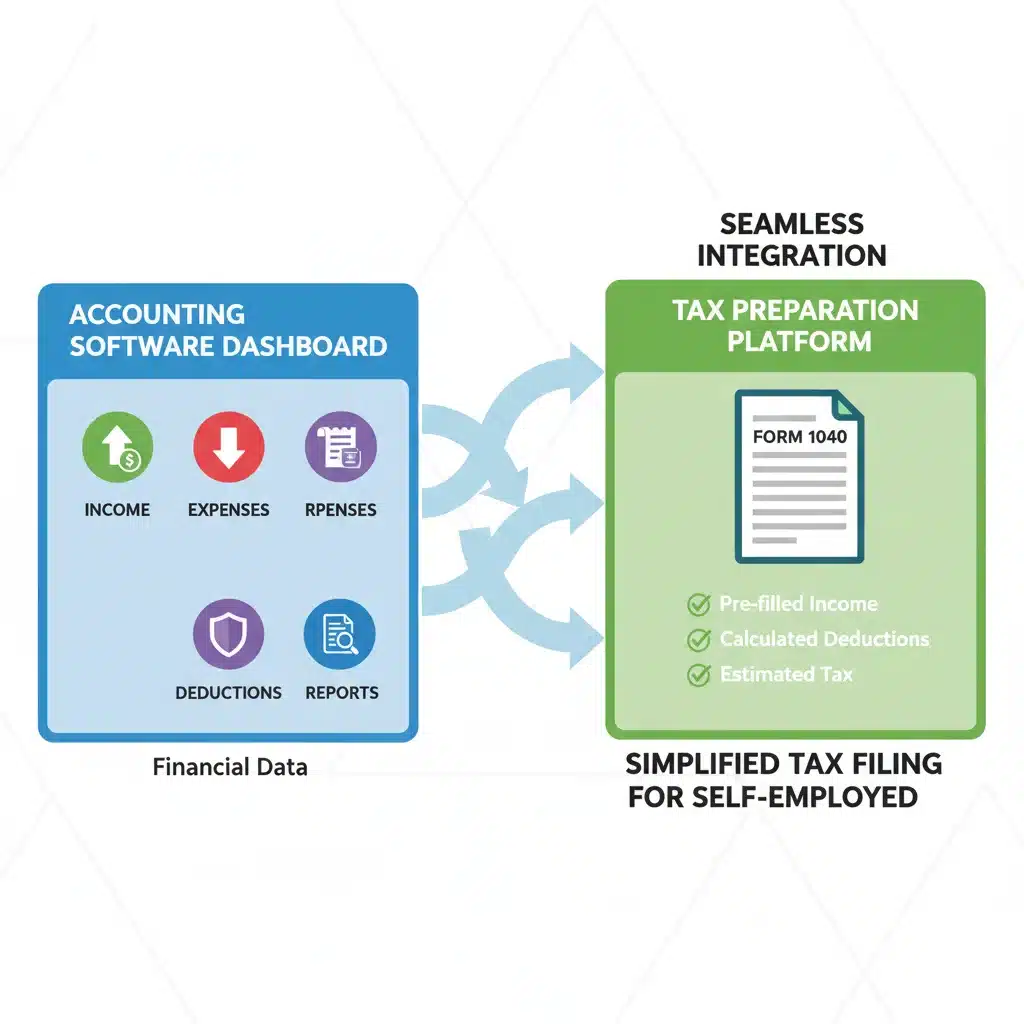
For many freelancers, the dread of tax season is a significant motivator for adopting accounting software. The ability to seamlessly integrate financial data with tax preparation platforms can save countless hours, reduce stress, and minimize the risk of errors. This is where QuickBooks Self-Employed truly differentiates itself.
QuickBooks Self-Employed and Tax Integration:
QBSE is purpose-built for tax time. Its core functionality revolves around simplifying Schedule C deductions and estimating quarterly tax payments. By automatically categorizing income and expenses and tracking mileage, it compiles all the necessary information for self-employment taxes. The direct integration with TurboTax Self-Employed is a game-changer. Users can export their QBSE data directly into TurboTax, which then populates the relevant tax forms. This eliminates manual data entry, significantly speeding up the filing process and ensuring accuracy. For freelancers who prioritize a smooth and worry-free tax experience, QBSE’s tax integration is a compelling reason to choose it as their freelancer accounting software.
FreshBooks and Tax Integration:
FreshBooks provides all the necessary financial reports required for tax filing, such as Profit & Loss statements, expense reports, and accounts receivable aging. These reports give freelancers a clear overview of their financial performance, which can then be used to manually input data into tax software or shared with an professional accountant. While FreshBooks doesn’t offer direct, one-click integration with a specific tax preparation platform like TurboTax, its comprehensive reporting ensures that all the information an accountant needs is readily available. For freelancers working with an accountant, FreshBooks provides the detailed financial records they require. However, for those who prefer to handle their own taxes and seek maximum automation in that specific area, the lack of direct integration might be a minor drawback compared to QBSE.
User Experience and Support
Beyond features, the daily usability of freelancer accounting software is paramount. Both QuickBooks Self-Employed and FreshBooks are generally well-regarded for their user interfaces, but they cater to slightly different user preferences.
QuickBooks Self-Employed User Experience:
QBSE boasts a clean, intuitive, and mobile-friendly interface. Its dashboard provides a quick overview of income, expenses, and estimated taxes. The transaction categorization process, with its swipe functionality, is particularly user-friendly. The focus is on simplicity and ease of use for the solo entrepreneur who might not have an extensive accounting background. Support is available through various channels, including online help articles, community forums, and direct customer service (phone and chat), though response times can vary.
FreshBooks User Experience:
FreshBooks also offers a modern, aesthetically pleasing, and intuitive interface. Its strength lies in its logical workflow for invoicing, time tracking, and project management. The dashboard is comprehensive, providing insights into outstanding invoices, recent payments, and project profitability. FreshBooks is often praised for its excellent customer support, which includes phone, email, and chat options, with a reputation for being responsive and helpful. The platform feels robust yet accessible, making it suitable for freelancers who need more than just basic tax-focused features.
Pricing Structures in 2026
Pricing is always a critical factor for freelancers operating on tight budgets. Both QuickBooks Self-Employed and FreshBooks offer subscription-based models, often with different tiers catering to varying needs.
QuickBooks Self-Employed Pricing:
QBSE typically offers a single primary plan, sometimes bundled with TurboTax Self-Employed for a slightly higher price. The standalone QBSE plan is generally more affordable than FreshBooks’ comparable offerings, reflecting its more focused feature set. Intuit often runs promotional discounts, so it’s always worth checking their official website for the latest pricing. The value proposition here is heavily weighted towards its tax preparation benefits.
FreshBooks Pricing:
FreshBooks offers multiple pricing tiers (e.g., Lite, Plus, Premium, and Select). The Lite plan is designed for basic invoicing and expense tracking for a single user, while higher tiers add features like double-entry accounting, project management, more clients, and additional users. As you scale up features and client numbers, the cost increases. While potentially more expensive, these higher tiers provide significant value for growing freelance businesses or those with more complex needs. FreshBooks also frequently offers discounts for new subscribers.
When evaluating pricing, consider not just the monthly cost but also the value of the features you’ll actually use. If tax simplicity is your main driver, QBSE might offer better value. If comprehensive invoicing, time tracking, and potential team collaboration are crucial, FreshBooks’ investment might be more justified.
Which Freelancer Accounting Software is Right for You in 2026?
The choice between QuickBooks Self-Employed and FreshBooks ultimately depends on your specific needs, business model, and priorities as a freelancer in 2026. Both are excellent tools, but they excel in different areas.
Choose QuickBooks Self-Employed if:
- Your primary goal is to simplify tax preparation and maximize deductions.
- You want automatic mileage tracking.
- You need an easy way to separate business and personal expenses with minimal manual effort.
- You are a sole proprietor or gig worker with relatively straightforward accounting needs.
- You already use or plan to use TurboTax for filing your self-employment taxes.
- Budget is a significant concern, and you need a cost-effective solution focused on tax compliance.
Choose FreshBooks if:
- You send a high volume of professional, customizable invoices and require robust invoicing features.
- You bill clients by the hour and need comprehensive time tracking capabilities.
- You manage multiple projects and need tools for project management and profitability tracking.
- You plan for your business to grow and might eventually hire contractors or require double-entry accounting.
- You value detailed financial reporting beyond basic profit & loss.
- You work with an accountant and need to provide them with comprehensive financial records.
It’s also worth noting that both platforms offer free trials. Taking advantage of these trials to test out the features with your own business data can be invaluable in making the right decision. Consider how each platform integrates with your existing workflows, how intuitive you find the interface, and whether it effectively addresses your most pressing financial management challenges.
Conclusion: Empowering Your Freelance Journey with the Right Tools
In the dynamic world of freelancing, having the right freelancer accounting software is not just a convenience; it’s a necessity for financial health, compliance, and peace of mind. Both QuickBooks Self-Employed and FreshBooks offer compelling solutions tailored to the self-employed, each with a distinct set of strengths. QuickBooks Self-Employed stands out for its unparalleled focus on tax optimization, automatic expense categorization, and seamless integration with TurboTax, making it an ideal choice for freelancers whose main priority is simplifying tax season.
On the other hand, FreshBooks excels in professional invoicing, robust time tracking, and comprehensive project management, making it the go-to solution for service-based freelancers and small businesses looking for an all-in-one client and project management tool with strong accounting capabilities. As you navigate your freelance journey in 2026, carefully evaluate your current needs and future aspirations. By aligning the features and philosophies of these powerful platforms with your unique business requirements, you can select the freelancer accounting software that will best empower your financial success and allow you to focus on what you do best: delivering exceptional work to your clients.